moemail.app
A cute temporary email service built with NextJS + Cloudflare technology stack 🎉
English |
简体中文
Live Demo •
Documentation •
Features •
Tech Stack •
Local Run •
Deployment •
Email Domain Config •
Permission System •
System Settings •
Sending Emails •
Webhook Integration •
OpenAPI •
CLI Tool •
Environment Variables •
Github OAuth Config •
Google OAuth Config •
Contribution •
License •
Community •
Support
https://moemail.app
Full Documentation : https://docs.moemail.app
The documentation site contains detailed usage guides, API documentation, deployment tutorials, and other complete information.
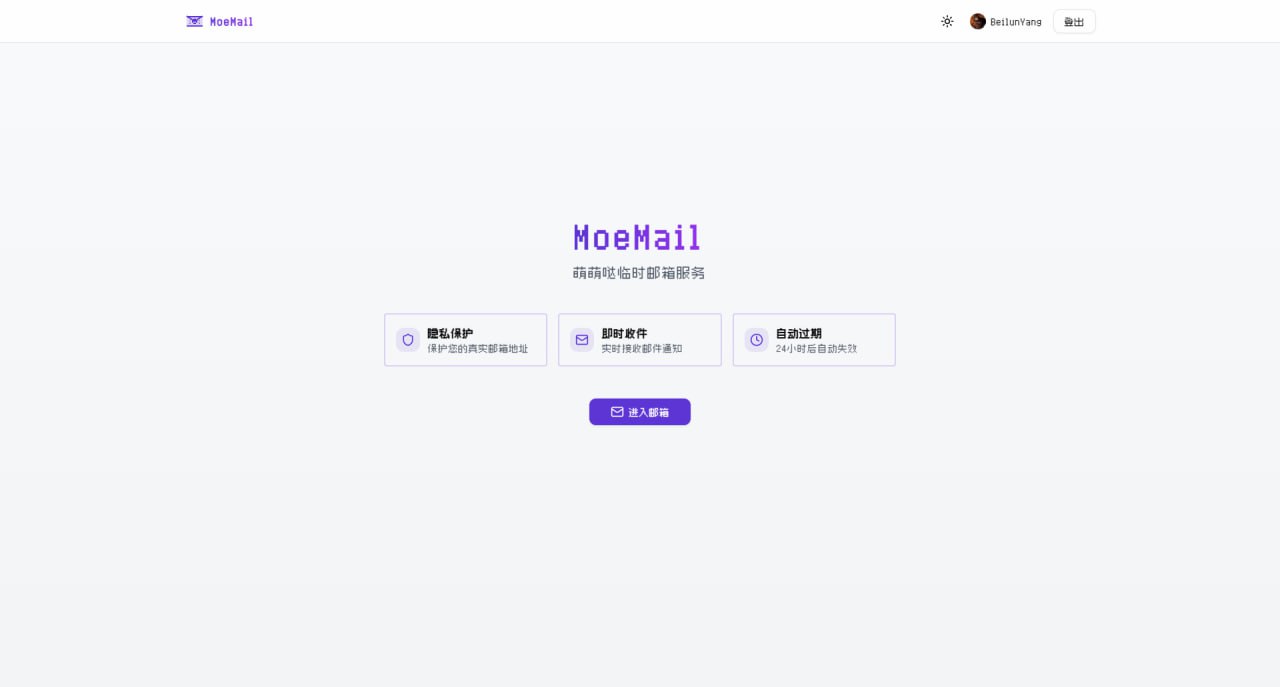
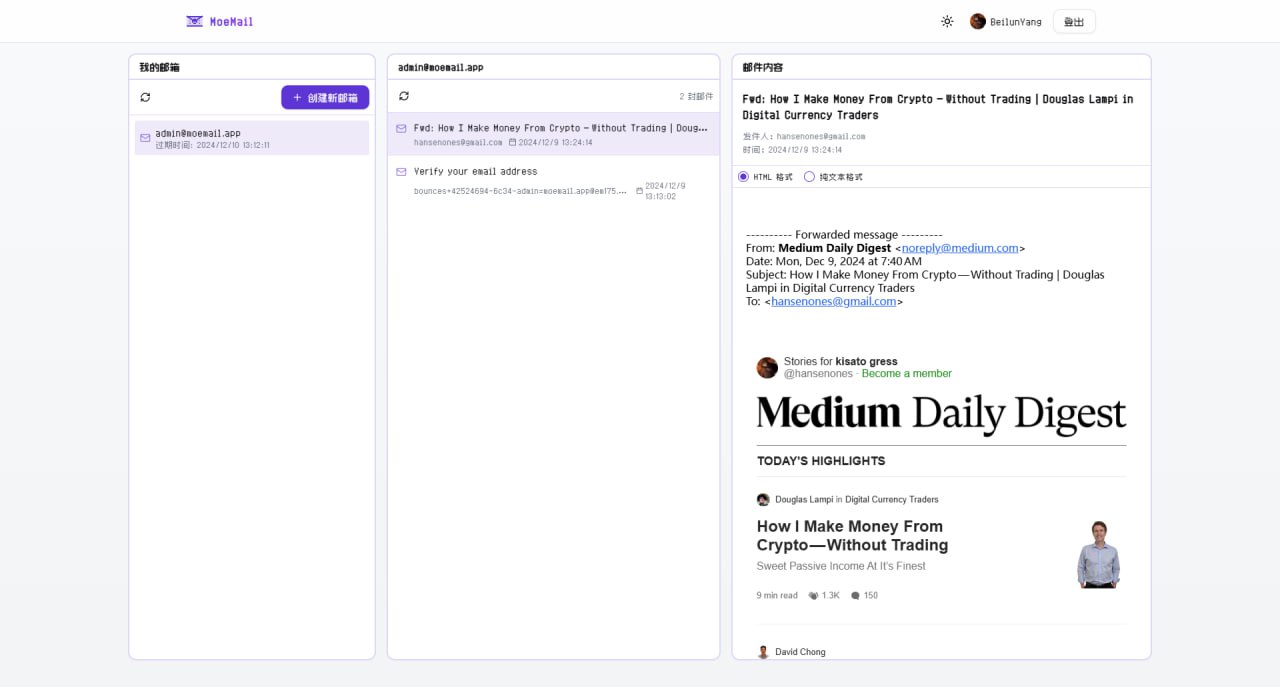
🔒 Privacy Protection : Protect your real email address from spam and unnecessary subscriptions ⚡ Real-time Receipt : Automatic polling, receive email notifications instantly ⏱️ Flexible Validity : Supports 1 hour, 24 hours, 3 days, or permanent validity 🎨 Theme Switching : Supports light and dark modes 📱 Responsive Design : Perfectly adapted for desktop and mobile devices 🔄 Auto Cleanup : Automatically cleans up expired mailboxes and emails 📱 PWA Support : Support PWA installation 💸 Free Self-hosting : Built on Cloudflare, capable of free self-hosting without any cost 🎉 Cute UI : Simple and cute UI interface 📤 Sending Function : Support sending emails using temporary addresses, based on Resend service 🔔 Webhook Notification : Support receiving new email notifications via webhook 🛡️ Permission System : Role-based access control system 🔑 OpenAPI : Support accessing OpenAPI via API Key 🤖 Agent-first CLI : CLI tool designed for AI agents to automate email workflows 🌍 Multi-language Support : Supports Chinese and English interfaces, freely switchable Node.js 18+ Pnpm Wrangler CLI Cloudflare Account Clone the repository: git clone https://github.com/beilunyang/moemail.git
cd moemail
Install dependencies: Setup Wrangler: cp wrangler.example.json wrangler.json
cp wrangler.email.example.json wrangler.email.json
cp wrangler.cleanup.example.json wrangler.cleanup.json
Set Cloudflare D1 database name and database ID.
Setup Environment Variables: cp .env.example .env.local
Set AUTH_GITHUB_ID, AUTH_GITHUB_SECRET, AUTH_SECRET.
Create local database schema: Start development server: Test Email Worker:
Currently cannot run and test locally, please use Wrangler to deploy the email worker and test. Test Cleanup Worker: pnpm dev:cleanup
pnpm test:cleanup
Generate Mock Data (Mailboxes and Messages): https://www.youtube.com/watch?v=Vcw3nqsq2-E
Local Wrangler Deployment Create .env file
Set Environment Variables in the .env file.
Run deployment script
pnpm dlx tsx ./scripts/deploy/index.ts
Github Actions Deployment This project supports automated deployment using GitHub Actions. It supports the following triggers:
Auto Trigger : Automatically triggers deployment flow when a new tag is pushed.Manual Trigger : Manually trigger in the GitHub Actions page.
Add the following Secrets in GitHub repository settings:
CLOUDFLARE_API_TOKEN: Cloudflare API TokenCLOUDFLARE_ACCOUNT_ID: Cloudflare Account IDAUTH_GITHUB_ID: GitHub OAuth App IDAUTH_GITHUB_SECRET: GitHub OAuth App SecretAUTH_SECRET: NextAuth Secret, used to encrypt session, please set a random stringCUSTOM_DOMAIN: Custom domain for the website (Optional, if empty, uses Cloudflare Pages default domain)PROJECT_NAME: Pages project name (Optional, if empty, defaults to moemail)DATABASE_NAME: D1 database name (Optional, if empty, defaults to moemail-db)KV_NAMESPACE_NAME: Cloudflare KV namespace name, used for site settings (Optional, if empty, defaults to moemail-kv)
Choose trigger method:
Method 1: Push Tag Trigger
# Create a new tag# Push tag to remote repository
Method 2: Manual Trigger
Go to the Actions page of the repository Select "Deploy" workflow Click "Run workflow"
Deployment progress can be viewed in the Actions tab of the repository.
Ensure all Secrets are set correctly. When using tag trigger, the tag must start with v (e.g., v1.0.0).
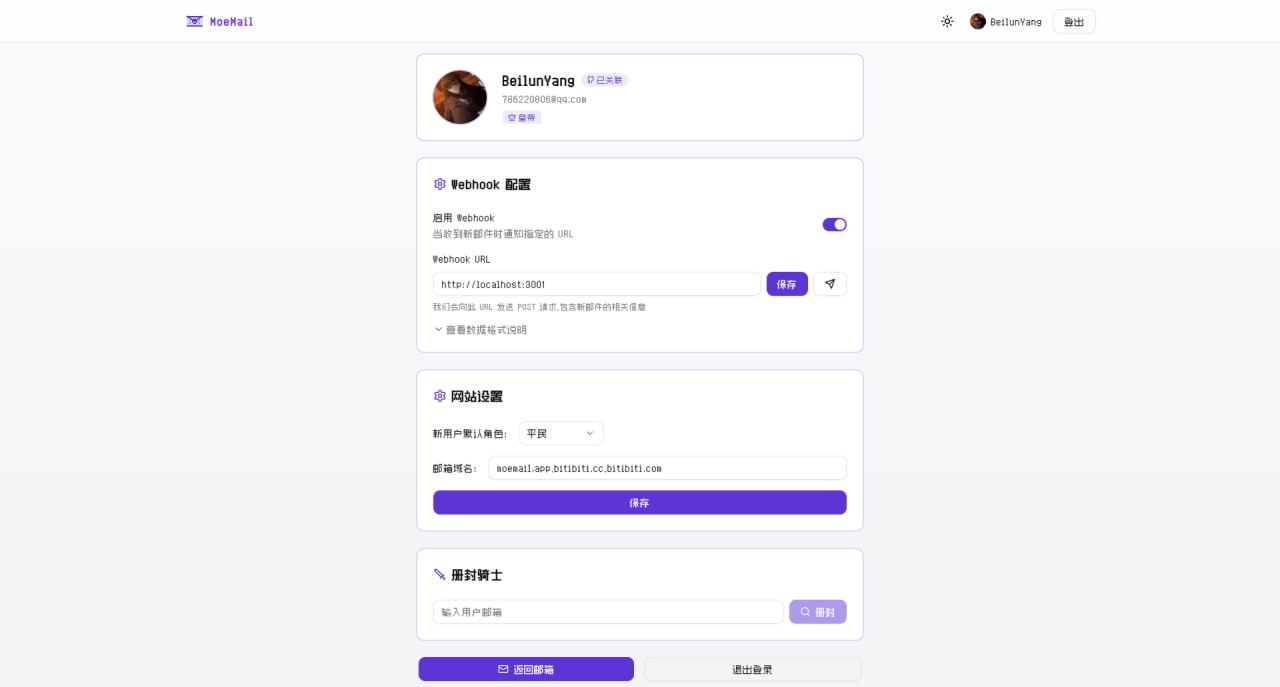
Email Domain Configuration In the MoeMail User Profile page, you can configure the
site's email domains. Supports multiple domain configurations, separated
by commas.
Cloudflare Email Routing Configuration To make email domains effective, you also need to
configure email routing in the Cloudflare console to forward received
emails to the Email Worker.
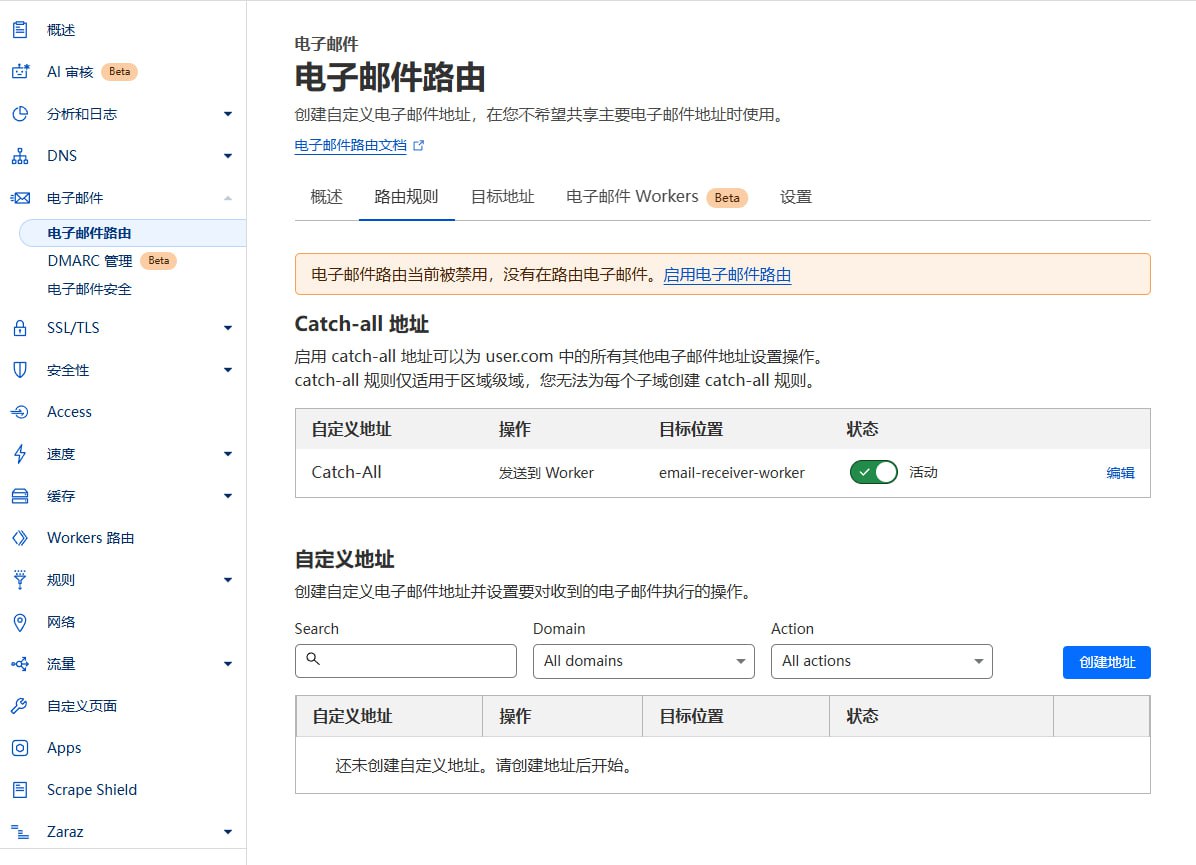
Login to Cloudflare Console Select your domain Click "Email" -> "Email Routing" in the left menu If it shows "Email Routing is currently disabled", please click "Enable Email Routing"
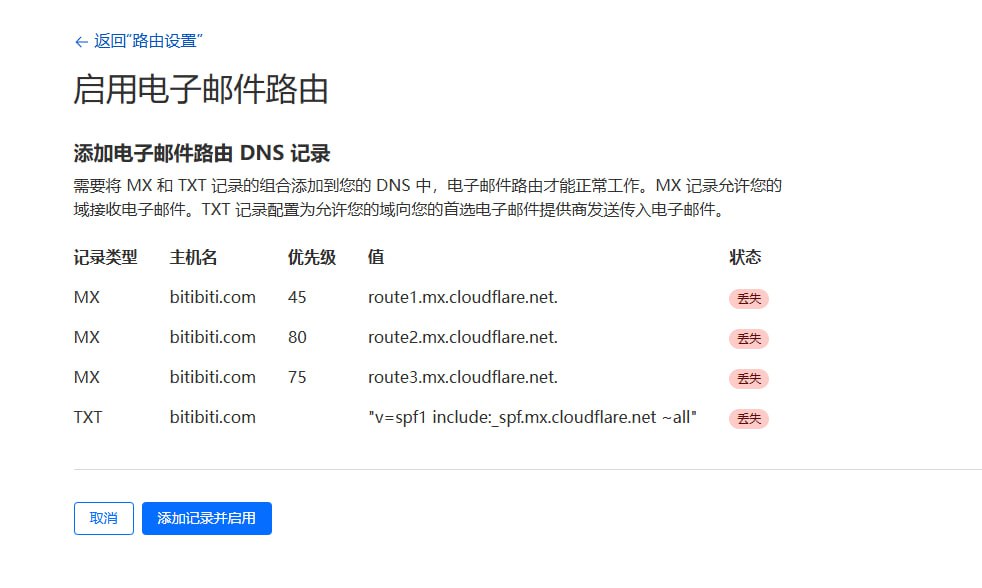
After clicking, it will prompt you to add Email Routing DNS records, click "Add records and enable"
Configure Routing Rules:
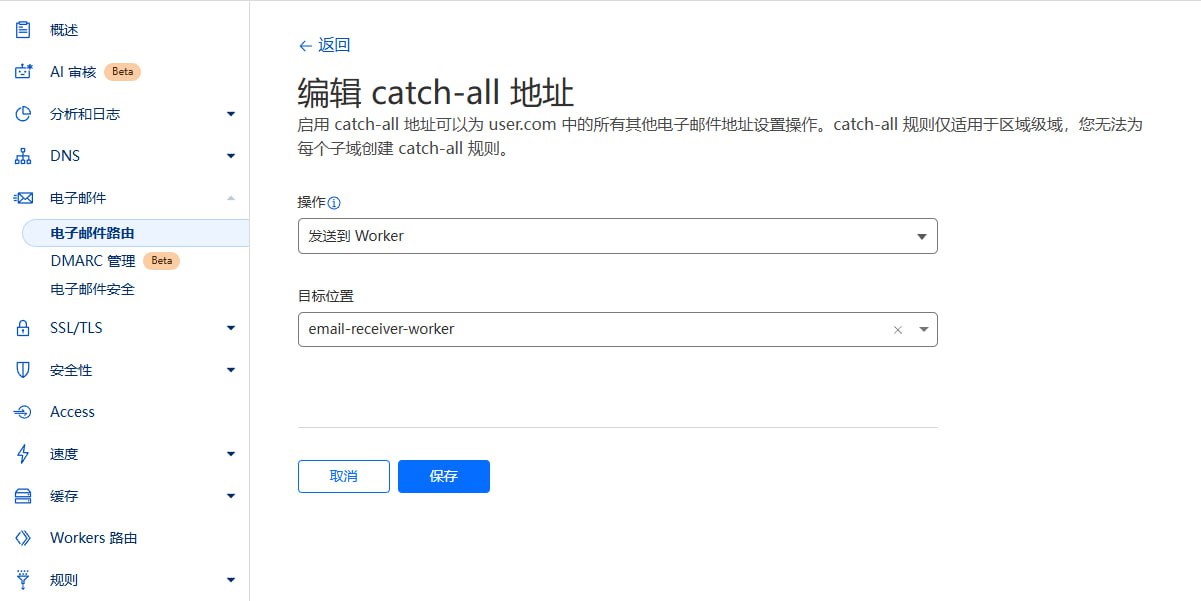
Catch-all address: Enable "Catch-all" Edit Catch-all address Action: Select "Send to Worker" Destination: Select the "email-receiver-worker" you just deployed Save
Ensure domain DNS is hosted on Cloudflare. Email Worker must be successfully deployed. If Catch-All status is unavailable (stuck loading), please click Destination addresses next to Routing rules, and bind an email address there. The project uses a Role-Based Access Control (RBAC) system.
New user default roles are configured by the Emperor in the site settings in the User Profile:
Duke: New users get temporary email, Webhook config permissions, and API Key management permissions. Knight: New users get temporary email and Webhook config permissions. Civilian: New users have no permissions, need to wait for Emperor to promote to Knight or Duke. The system includes four role levels:
Emperor
Website Owner Has all permissions Only one Emperor per site
Duke
Super User Can use temporary email features Can configure Webhook Can create API Key to call OpenAPI Can be demoted to Knight or Civilian by Emperor
Knight
Advanced User Can use temporary email features Can configure Webhook Can be demoted to Civilian or promoted to Duke by Emperor
Civilian
Regular User No permissions Can be promoted to Knight or Duke by Emperor
Become Emperor
The first user to visit /api/roles/init-emperor interface will become the Emperor (Website Owner). Once an Emperor exists, no other user can be promoted to Emperor.
Role Changes
The Emperor can set other users as Duke, Knight, or Civilian in the User Profile page. Email Management : Create and manage temporary emailsWebhook Management : Configure Webhooks for email notificationsAPI Key Management : Create and manage API access keysUser Management : Promote/Demote user rolesSystem Settings : Manage global system settingsSystem settings are stored in Cloudflare KV, including:
DEFAULT_ROLE: Default role for new users, values: CIVILIAN, KNIGHT, DUKEEMAIL_DOMAINS: Supported email domains, comma-separatedADMIN_CONTACT: Administrator contact infoMAX_EMAILS: Maximum number of emails per userEmperor role can configure these in the User Profile page.
MoeMail supports sending emails using temporary addresses, based on Resend service.
📨 Send from Temp Email : Use created temporary emails as sender 🎯 Role Limits : Different roles have different daily sending limits 💌 HTML Support : Supports rich text email format
Role
Daily Limit
Description
Emperor
Unlimited
Admin has no limits
Duke
5/day
Default 5 emails per day
Knight
2/day
Default 2 emails per day
Civilian
Forbidden
No sending permission
💡 Tip : The Emperor can customize the daily limits for Dukes and Knights in the Mail Service Configuration.
Configure Sending Service
Get Resend API Key
Register at Resend Create API Key in console Copy API Key for later use
Configure Service
Login as Emperor Go to User Profile In "Resend Service Configuration":
Enable Sending Service switch Enter Resend API Key Set daily limits for Duke and Knight (Optional) Save configuration
Verify Configuration
After saving, authorized users will see a "Send Email" button in the email list Click to open dialog and test
Create Temp Email
Create a new temporary email in Mailbox page
Send Email
Find the email in the list Click "Send Email" button next to it Fill in:
Recipient address Subject Content (supports HTML) Click "Send"
View History
Sent emails are saved in the message list of the corresponding mailbox View all sent/received emails in mailbox detail page 📋 Resend Limits : Please note Resend's sending limits and pricing 🔐 Domain Verification : Using custom domains requires verification in Resend 🚫 Anti-Spam : Please follow email sending standards, avoid spamming 📊 Quota Monitoring : System counts daily usage, stops sending when limit reached 🔄 Quota Reset : Daily quota resets at 00:00 When a new email is received, the system sends a POST request to the configured and enabled Webhook URL.
Request Header
Content-Type: application/jsonX-Webhook-Event: new_message
{
"emailId" : " email-uuid" "messageId" : " message-uuid" "fromAddress" : " sender@example.com" "subject" : " Email Subject" "content" : " Email Text Content" "html" : " Email HTML Content" "receivedAt" : " 2024-01-01T12:00:00.000Z" "toAddress" : " your-email@moemail.app"
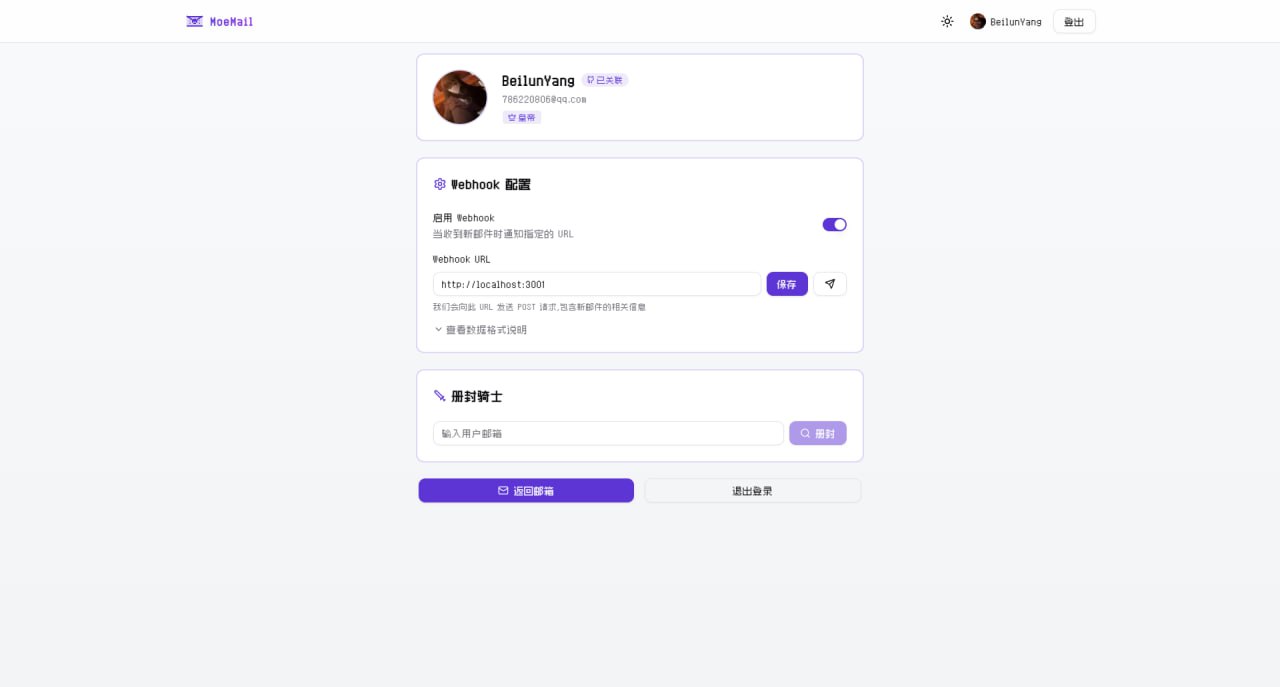
Click avatar to enter User Profile Enable Webhook Set notification URL Click Test button Save to receive notifications The project provides a simple test server:
The test server listens on port 3001 (http://localhost:3001 ) and prints received Webhook details.
For external testing, use Cloudflare Tunnel:
pnpx cloudflared tunnel --url http://localhost:3001
Webhook must respond within 10 seconds Non-2xx response triggers retry The project provides OpenAPI interfaces, accessible via
API Key. API Keys can be created in User Profile (Requires Duke or
Emperor role).
Add API Key to request header:
Response:
{
"defaultRole" : " CIVILIAN" "emailDomains" : " moemail.app,example.com" "adminContact" : " admin@example.com" "maxEmails" : " 10"
POST /api/emails/generate
Content-Type: application/json"name" : " test" "expiryTime" : 3600000 ,
"domain" : " moemail.app"
Params:
name: Prefix (optional)expiryTime: Validity in ms. 3600000(1h), 86400000(24h), 604800000(7d), 0(Permanent)domain: From configResponse:
{
"id" : " email-uuid-123" "email" : " test@moemail.app"
GET /api/emails?cursor=xxx
GET /api/emails/{emailId}?cursor=xxx
DELETE /api/emails/{emailId}
GET /api/emails/{emailId}/{messageId}
POST /api/emails/{emailId}/share
Content-Type: application/json"expiresIn" : 86400000
}
GET /api/emails/{emailId}/share
DELETE /api/emails/{emailId}/share/{shareId}
Create Message Share Link POST /api/emails/{emailId}/messages/{messageId}/share
Content-Type: application/json"expiresIn" : 86400000
}
GET /api/emails/{emailId}/messages/{messageId}/share
Delete Message Share Link DELETE /api/emails/{emailId}/messages/{messageId}/share/{shareId}
MoeMail provides an agent-first CLI tool for AI agents and automation workflows.
# Configure API endpoint and keyset api-url https://moemail.app
moemail config set api-key YOUR_API_KEY
# Create temporary email# Wait for new messages (polling)wait --email-id < id> --timeout 120 --json
# Read message contentread --email-id < id> --message-id < id> --json
# Delete email< id>
A typical AI agent verification flow in 3 tool calls:
# 1. Create mailbox$( moemail create --domain moemail.app --expiry 1h --json) $( echo $EMAIL | jq -r ' .id' ) $( echo $EMAIL | jq -r ' .address' ) # 2. Wait for verification email$( moemail wait --email-id $EMAIL_ID --timeout 120 --json) $( echo $MSG | jq -r ' .messageId' ) # 3. Read content, extract verification code$( moemail read --email-id $EMAIL_ID --message-id $MSG_ID --json)
Install the built-in skill so AI agents (Claude Code, Codex, etc.) automatically know how to use MoeMail:
# Auto-detect installed agent platforms and install# Or specify a platform
For full documentation, see packages/cli/README.md .
AUTH_GITHUB_ID: GitHub OAuth App IDAUTH_GITHUB_SECRET: GitHub OAuth App SecretAUTH_GOOGLE_ID: Google OAuth App IDAUTH_GOOGLE_SECRET: Google OAuth App SecretAUTH_SECRET: NextAuth SecretCLOUDFLARE_API_TOKEN: Cloudflare API TokenCLOUDFLARE_ACCOUNT_ID: Cloudflare Account IDDATABASE_NAME: D1 Database NameDATABASE_ID: D1 Database ID (Optional, auto-fetched if empty)KV_NAMESPACE_NAME: KV NameKV_NAMESPACE_ID: KV ID (Optional, auto-fetched if empty)CUSTOM_DOMAIN: Custom domainPROJECT_NAME: Pages Project NameGithub OAuth App Configuration Login Github Developer create new OAuth App Generate Client ID and Client Secret Configure:
Application name: <your-app-name>Homepage URL: https://<your-domain>Authorization callback URL: https://<your-domain>/api/auth/callback/github
Google OAuth App Configuration
Visit Google Cloud Console create project Configure OAuth consent screen Create OAuth Client ID
Type: Web application Authorized Javascript origins: https://<your-domain> Authorized redirect URIs: https://<your-domain>/api/auth/callback/google Get Client ID and Client Secret Configure env vars AUTH_GOOGLE_ID and AUTH_GOOGLE_SECRET