基于Flux项目的云原生GitOps实践.
什么是GitOps?
GitOps, 这已经并不是一个新鲜的概念了。2018年5月初在丹麦举行的哥本哈根KubeCon大会上,Weaveworks公司的演讲将GitOps与Istio Service Mesh进行了集成,如果说以前Docker Swarm与Kubernetes竞争之时Docker公司提出了Docker Native,CNCF基于Kubernetes提出了自己的Cloud Native,毫不夸张的说,Weaveworks公司开源的Weave Flux也可以说是GitOps的‘Native’了。而在2019年8月20日,Flux项目也最终成功加入了CNCF Sandbox,成为了CNCF Sandbox中的一员。

当然,GitOps的概念是从DevOps慢慢延伸出来的。把时间轴向前调调整,如2014年左右如火如荼的DevOps一样,当时从大到小的互联网企业都在招聘DevOps工程师。然而慢慢脱离了以前DevOps理念的不成熟,随着DevOps的发展,人们才慢慢意识到DevOps并不是所谓的"运维开发", 而是一种注重了开发团队、测试团队、运维团队的更好的沟通协作,从而去实现持续集成和持续交付的最佳实践。
如果说之前对DevOps的理念理解是"顾名思义"而导致的问题,那么现在的GitOps也多多少少面临着同样的境地,GitOps绝非是仅仅用Git去做CI/CD的Pipeline,既然Weaveworks开源的Weave Flux可以成为GitOps的主流实践,其给出的描述是这样的: “如果说DevOps的CI/CD Pipeline的终点是互联网公司交付的产品或者是我们最终发布的线上业务,GitOps则把目标转向了当前的容器编排事实标准--Kubernetes,而GitOps则是一种进行Kubernetes集群管理和应用程序交付的方法。”
这样一来,GitOps就于传统的DevOps划清了界限。更明确一点说: “DevOps注重的是产品发布中开发/运维/测试的沟通与协作,GitOps则更加贴近集群管理。这个集群还得是"拥抱云原生"基础设施的Kubernetes集群。”
既然贴近了云原生和Kubernetes,就不得不提到云原生12要素。更值得关注的是,这12要素的第一条就是"基准代码,多份部署"。GitOps的设计者也意识到了这一点,在GitOps中,一旦Git仓库中的代码被更改,CI/CD Pipeline也就会对我们的Kubernetes集群进行更改。GitOps摒弃了传统部署环境的多份环境多份配置文件,并且设计者也应用了Kubernetes控制循环的思想,用Git管理的Kubernetes集群的期望状态也会和Git仓库中的实时状态不断地进行比较。
接下来的实战就一起来看看Flux项目是怎么用Git来管理整个Kubernetes集群的。
Flux的安装默认提供了两种方式,传统的使用yaml文件部署的方式或者通过Helm的部署。但是Flux暂未支持Helm的V3版本,所以我们使用传统方式去部署(笔者闲谈:由于笔者使用的是Helm V3版本,也坚信去Tiller化的正确性,但是目前开源社区对Helm V3版本的响应程度着实不高,也导致更多人把精力转向了Kubernetes原生的Kustomize)
我们直接Clone Flux项目的Github Repo
% git clone https://github.com/fluxcd/flux
% cd flux/
% vim deploy/flux-deployment.yaml
在这里,我们需要将--git-url更改为存储生产环境yaml文件的Github Repo,当然如果不想把生产环境的yaml文件托管在Github上,Flux也提供了Gitlab的支持去更好的进行私有环境的部署与管理。

--git-url=git@github.com:YOUR-GITHUB/REPO-NAMEPS: 因为官方的例子过于繁琐,笔者在这里提供了更直观的例子。这个例子很简单,只由一个Nginx-Deployment和带有NodePort的Nginx-Service组成,项目已经存储在Github
部署Flux到Kubernetes集群中
% kubectl apply -f deployPS: 如果使用minikube进行实验,请确保安装socat
% yum install -y socat确保Flux Pod进入Running状态并Ready后,我们还需要下载fluxctl二进制命令包,fluxctl将与Kubernetes集群中的flux Pod进行交互。

% wget https://github.com/fluxcd/flux/releases/download/1.13.1/fluxctl_linux_amd64
% mv fluxctl_linux_amd64 fluxctl && chmod +x fluxctl && cp fluxctl /usr/local/bin/
fluxctl安装好之后,我们需要部署我们的Deploy Key到Github Repo上,以实现本地集群和远端Github Repo的连调。
我们可以通过fluxctl identity命令获取Flux的SSH公钥,如果你想打造一个更方便管理的环境,Flux也可以使用系统SSH所产生的私钥,具体的做法是先删除原本Flux的secret,再通过--from-file=priveate_key的方式重新创建需要被Pod挂载的Secret私钥。
% fluxctl identity当我们在Git Repo中通过SSH私密部署好Deploy Key并Allow Read/Write Access权限后,我们就可以尝试本地环境和远端Repo的同步了。
% fluxctl sync如果没有问题的话,Flux会返回以下信息:

这条信息的出现表明了集群同步已经完毕。接下来我们就可以尝试使用Git去管理Kubernetes集群了。
我们先执行kubectl get all查看Kubernetes集群的当前状态。
可以清楚的看到,我们没有手动的使用kubectl执行任何操作,Flux已经自动的帮我们做好了本地集群和远端Git Repo的同步工作,Nginx-Pod已经处在了Running状态。

我们可以使用curl命令对已经被Flux部署在Kubernetes集群中的Nginx进行访问测试,可以看到访问测试是成功的。

在这时,如果我们尝试用git去对集群做出更改,整体的流程和我们平时修改代码的流程是大致相同的
1. 如果本地仓库没有yaml文件,我们需要先从远端仓库pull下来我们的yaml
2. 在本地仓库去更改我们的yaml文件,在这个例子中,我对之前所部署的Nginx版本做出了修改,从1.13.12升级到了1.14.2

3. git add FILE_CHANGED
4. git commit -m "DESCRIPTION"
5. git push
一旦我们的代码被提交到远端的GitRepo仓库后,我们就可以再次使用fluxctl sync命令去进行同步。如果不执行这条命令,Flux也会过几分钟之后自动的去进行同步。
通过curl命令的测试结果我们可以看到,集群更新已经完毕,我们Kubernetes集群中的Nginx也修改到了1.14.2版本。

参考连接:
- Flux项目Github Repo: https://github.com/fluxcd/flux
- Flux项目官方网站: https://fluxcd.io/
from https://github.com/youngercloud/flux-get-start-easy
-----
Successor: https://github.com/fluxcd/flux2
This repository contains the source code of Flux Legacy (v1).
Flux v1 has reached end of life and has been replaced by fluxcd/flux2 and its controllers entirely.
If you consider using Flux, please take a look at https://fluxcd.io/flux/get-started to get started with v2.
If you are on Flux Legacy, please follow the migration guide. If you need hands-on help migrating, you can contact one of the companies listed here.
Flux was initially developed by Weaveworks and made open source in 2016. Over the years the community around Flux & GitOps grew and in 2019 Weaveworks decided to donate the project to CNCF.
After joining CNCF, the Flux project has seen massive adoption by various organisations. With adoption came a wave of feature requests that required a major overhaul of Flux monolithic code base and security stance.
In April 2020, the Flux team decided to redesign Flux from the ground up using modern technologies such as Kubernetes controller runtime and Custom Resource Definitions. The decision was made to break Flux functionally into specialised components and APIs with a focus on extensibility, observability and security. These components are now called the GitOps Toolkit.
In 2021, the Flux team launched Flux v2 with many long-requested features like support for multi-tenancy, support for syncing an arbitrary number of Git repositories, better observability and a solid security stance. The new version made it possible to extend Flux capabilities beyond its original GitOps design. The community rallied around the new design, with an overwhelming number of early adopters and new contributions, Flux v2 gained new features at a very rapid pace.
In 2022, Flux v2 underwent several security audits, and its code base and APIs became stable and production ready. Having a dedicated UI for Flux was the most requested feature since we started the project. For v2, Weaveworks launched a free and open source Web UI for Flux called Weave GitOps, which made Flux and the GitOps practices more accessible.
Today Flux is an established continuous delivery solution for Kubernetes, trusted by organisations around the world. Various vendors like Amazon AWS, Microsoft Azure, VMware, Weaveworks and others offer Flux as-a-service to their users. The Flux team is very grateful to the community who supported us over the years and made Flux what it is today.
from https://github.com/fluxcd/flux
-----
Open and extensible continuous delivery solution for Kubernetes. Powered by GitOps Toolkit.




Flux is a tool for keeping Kubernetes clusters in sync with sources of configuration (like Git repositories and OCI artifacts), and automating updates to configuration when there is new code to deploy.
Flux version 2 ("v2") is built from the ground up to use Kubernetes' API extension system, and to integrate with Prometheus and other core components of the Kubernetes ecosystem. In version 2, Flux supports multi-tenancy and support for syncing an arbitrary number of Git repositories, among other long-requested features.
Flux v2 is constructed with the GitOps Toolkit, a set of composable APIs and specialized tools for building Continuous Delivery on top of Kubernetes.
Flux is a Cloud Native Computing Foundation (CNCF) graduated project, used in production by various organisations and cloud providers.
To get started check out this guide on how to bootstrap Flux on Kubernetes and deploy a sample application in a GitOps manner.
For more comprehensive documentation, see the following guides:
- Ways of structuring your repositories
- Manage Helm Releases
- Automate image updates to Git
- Manage Kubernetes secrets with Flux and SOPS
If you need help, please refer to our Support page.
The GitOps Toolkit is the set of APIs and controllers that make up the runtime for Flux v2. The APIs comprise Kubernetes custom resources, which can be created and updated by a cluster user, or by other automation tooling.
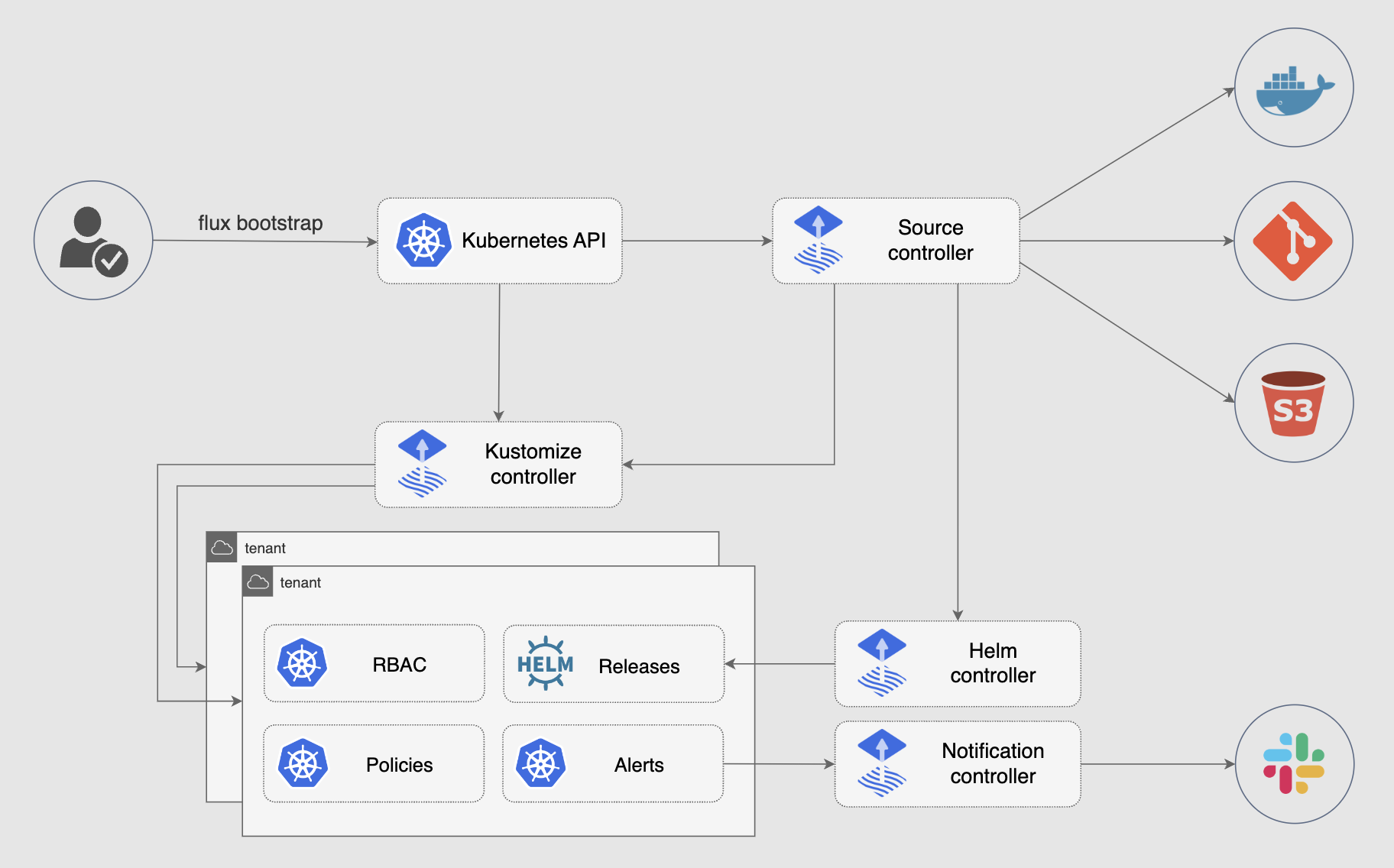
You can use the toolkit to extend Flux, or to build your own systems for continuous delivery -- see the developer guides.
- Source Controllers
- Kustomize Controller
- Helm Controller
- Notification Controller
- Image Automation Controllers
Need help or want to contribute? Please see the links below. The Flux project is always looking for new contributors and there are a multitude of ways to get involved.
- Getting Started?
- Look at our Get Started guide and give us feedback
- Need help?
- First: Ask questions on our GH Discussions page.
- Second: Talk to us in the #flux channel on CNCF Slack.
- Please follow our Support Guidelines (in short: be nice, be respectful of volunteers' time, understand that maintainers and contributors cannot respond to all DMs, and keep discussions in the public #flux channel as much as possible).
- Have feature proposals or want to contribute?
- Propose features on our GitHub Discussions page.
- Join our upcoming dev meetings (meeting access and agenda).
- Join the flux-dev mailing list.
- Check out how to contribute to the project.
- Check out the project roadmap.
from https://github.com/fluxcd/flux2/


No comments:
Post a Comment