Total Pageviews

Showing posts with label deno. Show all posts

Friday, 27 February 2026

如何把基于deno的github仓库导入到deno deploy平台?

 1. 准备工作

在导入之前,请确保你的 github仓库符合以下条件:

入口文件:仓库中有一个入口文件(例如main.ts , server.ts ,mod.ts 或index.ts)

代码已推送:确保你的最新代码已经git push到你的仓库或者你也可以在github.com/yourusername/yourrepo中,在线修改你的代码(当然你需先登录你的github账号)

2. 导入步骤

访问 https://console.deno.com/login,建议用你的github账号进行登录。登录后,就跳转到了

 https://console.deno.com/你的github账号名。然后点击'new app'按钮,在跳转到的页面里,

在复选框select user or organization里,选择用户名,我的用户名是briteming(它就是我的github账号名)。在briteming的下一行的select repository复选框里,输入你的仓库名进行搜索,(我的仓库名是tsb, tsb 是fork自https://github.com/lumeland/theme-simple-blog),点击搜索出来的仓库名,然后点击页面下方的create app按钮,deno.com平台就开始部署你的程序了,等待部署完成,部署完成后,我得到了网址https://tsb.briteming.deno.net/,它就是我的静态博客的网址。

项目地址: 

 https://github.com/lumeland/theme-simple-blog

 https://github.com/briteming/tsb

博客地址: https://tsb.briteming.deno.net/

上面说的‘ 你也可以在github.com/yourusername/yourrepo中,在线修改你的代码’就是指新建源帖。

访问https://github.com/briteming/tsb/tree/main/src/posts,新建源帖fh.md, 内容为:

---
title: 战马
date: '2026-02-22T20:30:00'
author: ym
tags:
  - misc1
  - misc2
  - misc3
comments:
  src: 'https://mastodon.gal/@misteroom/110810445656343599'
draft: false
---

此处写html代码或正文

(详见 https://github.com/briteming/tsb/blob/main/src/posts/fh.md?plain=1)

略等1分钟,博客网站就会更新 。

相关帖子: 安装基于deno的静态博客程序lume


Thursday, 26 February 2026

deno-azure-openai-proxy

 One-click deploy! Free to use, no server required. A Deno Deploy script to proxy OpenAI‘s request to Azure OpenAI Service. 


deno-azure-openai-proxy

License Azure Azure TS

English

一个部署Deno Deploy上在 Azure OpenAI API 的代理工具,可以将一个 OpenAI 请求转化为 Azure OpenAI 请求,方便作为各类开源 ChatGPT 的后端使用,无需服务器,免费使用。

特点

  1. 支持一键部署!
  2. 相比于cloudflare workers,可以无需代理,直连使用
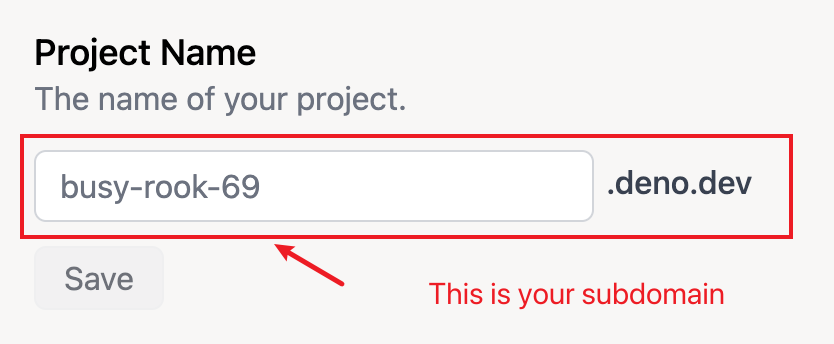
  3. 支持自定义二级域名(*.deno.dev)或者绑定自己的域名
  4. 支持打字机模式的流式响应
  5. 支持mapper,可以自定义模型映射规则,也支持直接透传模型名
  6. 无需服务器,免费在线部署,每日10万次请求额度

更新

  • 23.8.3 更新支持gpt-4-32k模型
  • 23.6.16 更新支持自定义api版本,具体版本见ApiVersion
  • 23.5.30 更新apiVersion并提升响应速度
  • 23.5.2 更新支持embeddings接口(感谢Shuenhoy)
  • 23.4.27 更新支持环境变量设置resourceName和mapper的值以及支持一键部署
  • 23.4.12 更新支持mapper模型映射规则

一键部署

  1. 点击 Deploy on Deno(首次点击要先登录Deno Deploy,登录完成之后重新点击这个链接即可进行部署)
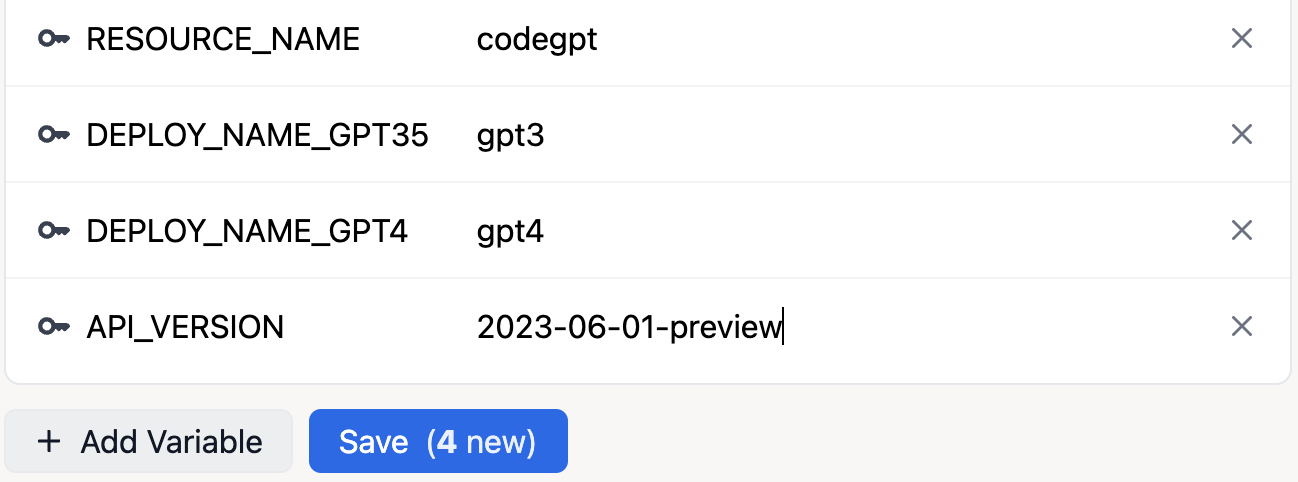
  2. 部署完成后设置环境变量
  • 环境变量设置方法

    在project的setting中的Environment Variables点击Add Variable environment 部署方法

  1. 在project的settings中自定义自己的二级域名或者绑定自己的域名 custom

手动部署方法

  1. 访问 https://dash.deno.com 并注册登录(可以直接使用github账号)
  2. 点击New Project新建项目
  3. 点击playground右侧的play进入编辑模式
  4. 将本项目的 main.ts中的内容复制并粘贴到编辑器中
  5. 通过直接修改或环境变量调整 resourceName 和 mapper 的值
    • mapper设置例子:如果你在azure上部署的gpt-3.5-turbo和gpt-4的模型deployment name为gpt35和gpt4,那么mapper按照如下设置

      const mapper:any = {
        'gpt-3.5-turbo': 'gpt35',
        'gpt-4': 'gpt4' 
      };
      

      其他的map规则直接按这样的格式续写即可

  6. 点击save and deploy进行保存并部署
  7. 返回到project的settings中自定义自己的二级域名或者绑定自己的域名

使用方法

将自己自定义的二级域名或绑定的自定义域名填写到自己所使用的gpt项目的api url中,选择设定过mapper的模型,并在api key 中填写自己的azure openai key即可使用。

备注

有问题的话欢迎提issue,觉得该项目对你有帮助的话欢迎star!

致谢

Inspired by https://github.com/haibbo/cf-openai-azure-proxy

from  https://github.com/hbsgithub/deno-azure-openai-proxy

Sunday, 22 February 2026

awesome-deno-cn


长期维护!中文圈下与 Deno 相关的 Awesome 资源全图谱


Deno 资源全图谱 · 专注中文版 Awesome

All Contributors

仓库目录可以使用 Github Chrome 插件来浏览。

为什么有这个项目?

Deno v1.0 于 2020 年 05 月 13 日正式发布 v1.0 版本,一个专注于中文技术圈的 Deno 资源列表呼之欲出。

以下资源 🌟 代表品质推荐(尚未正式开始标记),⚠️ 代表注意事项。由于资源分类的多样性考虑,部分章节内容可能会有所重复。

独特之处 🦖🦕

  • 长期提供更新,收集越来越多高质量的 Deno 资源,愿我们与 Deno 一起成长。
  • 随着 Deno 主版本进行版本归档更新。
  • 配套独家《Deno 钻研之术》电子书并随着本项目一起成长。
  • 及时跟进 @denolib/awesome-deno 仓库。
  • 寻找静态站点生成工具来让此资源清单更好看 -> 如果将每个条目“JSON“化就更好了。

还有如下很多事情可以做,期待你的贡献!

  • 为每条记录增加一个 150 字以内的简介,让用户能通过本仓库更直接地了解每个项目的核心功能,而不是只有短短的名字外链和十多个字的概要;
  • 添加更多资源;
  • 推荐适合 awesome 展示页的项目或提交相关 PR;
  • 通过大量资源一起梳理出更好的目录结构,绘制出与众不同的 Deno 资源图谱。

技术文档 🌟

源码阅读推荐

以下仓库从下方其他章节精选。

基础设施

Deno 源

虽然 Deno 可以直接导入 URL 代表着一定程度的去中心化,但是有中心化仓库也真香。

  • 和 Deno 生态强相关的源
    • deno.land/x:官方提供的第三方库注册中心。
    • nest.land:🌟。基于区块链去中心化仓库。
    • x.deno.js.cn:官方提供的第三方库的中国镜像站。
    • denopkg:在 Deno 项目中使用 GitHub 上的代码的更简单方法。
  • 基于 ES6 模块化机制的源
    • skypack.dev/:🌟。无需安装和构建工具即可加载优化的npm软件包。
    • jspm.io:允许从 CDN 中直接加载 NPM 的任何软件包。
    • jsdelivr.com/:开源下免费的 CDN。
    • esm.run:快速加载 JavaScript 模块的 CDN。
  • ...逐步添加中,欢迎 Star & Fork & PR。

包管理 && 配置管理

Web 框架 - 后端

Web 框架 - 前端

  • @alephjs/alephjs:🌟。Deno 下的 React 框架。
  • ...逐步添加中,欢迎 Star & Fork & PR。

环境变量

命令行

模板引擎

测试

数据库

WebSocket

命令行工具

  • @cacjs/cac:🌟。用于构建命令行应用程序的简单但功能强大的框架。
  • @ekaragodin/clone:一个方便克隆 Github 仓库到本地的简单实用程序。
  • @syumai/denoget:Deno 获取安装的可执行 Deno 脚本。
  • @syumai/denoinit:Deno 下简单的命令工具集。
  • @buttercubz/commands:为 Node.js 和 Deno 创建命令快捷方式。
  • @siokas/denomander:Deno 命令行界面的灵感来自 commander.js。
  • ...逐步添加中,欢迎 Star & Fork & PR。

应用级别

数据类型处理

IDE 插件

权限相关

  • @denofn/jwt:auth0/jsonwebtoken 的端口。
  • ...逐步添加中,欢迎 Star & Fork & PR。

JAM Stack/静态站点

  • @xcatliu/pagic:用 Deno 构建从 markdown 生成静态 html 页面的简单方法。
  • ...逐步添加中,欢迎 Star & Fork & PR。

从 Node 到 Deno

  • @garronej/denoify:🌟。对于希望支持 Deno 但不想编写和维护端口的 NPM 模块作者。
  • ...逐步添加中,欢迎 Star & Fork & PR。

TypeScript 相关

  • @zhmushan/dev_server:让 TypeScript 文件直接在 script 标签中使用。
  • @sindresorhus/type-fest:基本 TypeScript 类型的集合(sindresorhus端口/ type-fest)。
  • @neuledge/computed_types:类似 Joi 的 Typescript 和 Deno 验证器。
  • @motss/deno_mod:一个 TypeScript 插件,它将允许 Deno 之外的 TypeScript 以类似于在 Deno 内部进行解析的方式来解析模块。⚠️ 已归档。
  • ...逐步添加中,欢迎 Star & Fork & PR。

进程管理

热更新

  • @jinjor/watch:文件观察器(热更新)。
  • @joakimunge/denoliver:具有实时重新加载功能的简单,无依赖的文件服务器。
  • ...逐步添加中,欢迎 Star & Fork & PR。

容器化 & 自动化 & 云

其它

在线沙箱

机器人

数据展示

  • ...逐步添加中,欢迎 Star & Fork & PR。

成套解决方案

如果你有好的解决方案,欢迎提供在这里!

解决方案 - 项目模板

留坑,这里是未来探索的重点。主要罗列如何用 Deno 快速搭建起可供生产环境使用的成套解决方案。之前列到的很多库用来单一方面。 成套解决方案目前先重点探索提供项目模板的库。

  • ...逐步添加中,欢迎 Star & Fork & PR。

思考:

  • Deno + Oak + MySQL + RESTful 解决方案?
  • Deno + Oak + MongoDB + GraphQL 解决方案?
  • Deno + React 解决方案?

开发 Deno 模块

  • 如何开发 Deno (各种类别的)模块?
  • ...逐步添加中,欢迎 Star & Fork & PR。

技术教程

技术专栏(中文)

技术专栏(英文)

单篇文章(中文)

专注于收集高质量的博客文章,更多内容可以在谷歌/百度上搜索。目前 Deno 文章不多,尽可能多的罗列不设内容质量限制。 包含翻译。

单篇文章(英文)

演讲稿(中文)

  • ...逐步添加中,欢迎 Star & Fork & PR。

演讲稿(英文)

在线视频(中文)

在线视频(英文)

电子资源

专注收集公开免费的 PDF、PNG 以及电子书等资源,放置在本项目的 resources 文件夹下。

技术社区

开源组织

重点收集专注于使用 & 回馈 Deno 生态圈的第三方 Github 组织。

  • ...逐步添加中,欢迎 Star & Fork & PR。

社区列表(全网)

  • Deno Discord:🌟。Discord 上的 Deno 官方聊天室,有中文社区。
  • deno.dev:🌟。开发中。
  • deno.js.cn:🌟。Deno 中文社区。
  • denocn.org:🌟。Deno 中文社区。
  • yydeno:YY 大前端团队 Deno 仓库。
  • ...逐步添加中,欢迎 Star & Fork & PR。

讨论热帖(中文)

讨论热帖(英文)

谁在用 Deno?

重点收集已经部署在生产环境的应用,欢迎推荐你的案例,逐步完善中。

  • UsingDeno - 使用 Deno 的 Web 应用程序和项目列表 🦕。
  • ...逐步添加中,欢迎 Star & Fork & PR。

其它订阅

新闻媒体(英文)

社交媒体(英文)

  • twitter@deno_land:Deno Land 官方推特。
  • ...逐步添加中,欢迎 Star & Fork & PR。

番外篇

从 Node.js 到 Deno.js

Deno 依赖的技术清单

Deno 本身依赖的技术的清单库。

仓库更新日志

  • 2020-04-14 初始化本项目,填充独特的中文版内容。
  • 2020-04-14 跟进最新的(180+ Star) @olivewind/awesome-deno-cn 仓库内容。
  • 2020-05-13 新增《Deno 钻研之术》项目,将本项目作为前者的配套项目。
  • 2020-05-14 同步最新的 @denolib/awesome-deno 仓库内容。
  • 2020-05-17 跟进中文化后大改版的(200+ Star) @olivewind/awesome-deno-cn 仓库内容。
  • 2020-05-22 全网大量搜索 Deno 中英文资源并入库,发布 v1.0 版本并收录在《Deno 钻研之术》第二篇中。
  • 2020-08-07 大幅更新:
    • 跟随 Deno 主版本号同步发布 v1.2.2 版本。
    • 新增 all-contributor 贡献者机器人。
    • 增加如下章节:Deno 版本日志、解决方案。
    • 填充大量内容,新增贡献准则。
  • 2021-02-25 大幅更新:
    • 跟随 Deno 主版本号提前发布 v1.8.0 版本。
    • 将之前尚未分类的数十条进行分类
  • 2021-xx-xx
    • 引入 Pagic 来展示此资源清单
    • 同步最新的 @denolib/awesome-deno 内容
    • 全网大量搜索 Deno 中英文资料并入库

贡献者 ✨

感谢如下贡献者的贡献 (emoji key):


hylerrix

🤔 📖

JohannLai

📖

champ

📖

Bd999

📖

杨俊宁

📖

Booker Zhao

📖

木杉

📖

kily zhou

📖


guzhongren
📖

from https://github.com/hylerrix/awesome-deno-cn

Introducing Lume CLI


The best way to run Lume is using the Deno tasks. It's the most portable way to run Lume without installing anything else but Deno, and it ensures that the Lume version is the same as specified in the import_map.json file. In fact, there's a plan to remove the CLI interface completely.

The only drawback of using Deno tasks is they are more verbose to type. Instead of simply running lume -s or lume run my-script you have to type deno task lume -s and deno task lume run my-script.

In order to keep using tasks to run Lume and, at the same time, having a more ergonomic way to run the commands, I have released the new Lume CLI.

To install it, just run:

deno install --allow-run --name lume --force --reload https://deno.land/x/lume_cli/mod.ts

Lume CLI is just a small script to add the deno task words at the beginning of your lume commands. For example, if you run lume -s, the CLI will run deno task lume -s.

It's an independent module, separated from the Lume repository, so it's up to you to use it or not.

It also includes two additional commands:

  • lume init: To initialise Lume in the current directory. It's like running deno run -Ar https://deno.land/x/lume/init.ts.
  • lume ugrade-cli: As you may guess, it will upgrade the Lume CLI to the latest version.

Lume CLI combines the best of the two worlds and opens the door to removing the old CLI interface in the Lume repo sometime soon.

来自 https://lume.land/blog/posts/lume-cli/

安装基于deno的静态博客程序lume

首先安装deno,一句命令搞定:

$ curl -fsSL https://deno.land/x/install/install.sh | sh 

$ deno run -A https://lume.land/init.ts --theme=simple-blog
显示:
 BENVIDO - WELCOME! 🎉🎉🎉

  Lume has been configured successfully!
  Theme installed: Simple Blog


Quick start:

  deno task serve to start a local server
  deno task cms to start the CMS

See https://lume.land for online documentation
See https://discord.gg/YbTmpACHWB to propose new ideas and get help at Discord
See https://github.com/lumeland/lume to view the source code and report issues
See https://github.com/lumeland/theme-simple-blog to view the theme source code and report issues
See https://opencollective.com/lume to support Lume development

$  git clone https://github.com/lumeland/theme-simple-blog
cd theme-simple-blog
cd src
deno task build
显示:
...
🍾 Site built into ./_site
cd ..
cd _site
12799@DESKTOP-B6LK9IO MINGW64 ~/theme-simple-blog/_site (main)
$ ls
404.html  author/   favicon.png  feed.xml    js/        posts/      sitemap.xml
archive/  contact/  feed.json    index.html  pagefind/  robots.txt  styles.css
(可见~/theme-simple-blog/_site就是静态网站的根目录

新建源帖:
12799@DESKTOP-B6LK9IO MINGW64 ~/theme-simple-blog/_site (main)
$ cd ../src/posts
12799@DESKTOP-B6LK9IO MINGW64 ~/theme-simple-blog/src/posts (main)
$ nano fh.md
$ cat fh.md
显示:
---
title: 战马
date: '2026-02-22T20:30:00'
author: ym
tags:
  - misc1
  - misc2
  - misc3
comments:
  src: 'https://mastodon.gal/@misteroom/110810445656343599'
draft: false
---

此处写正文或html codes

$ 12799@DESKTOP-B6LK9IO MINGW64 ~/theme-simple-blog/src/posts (main)
$ cd ..
12799@DESKTOP-B6LK9IO MINGW64 ~/theme-simple-blog/src (main)
$ deno task build
$ cd ../_site

12799@DESKTOP-B6LK9IO MINGW64 ~/theme-simple-blog/_site (main)
$ python3 -m http.server 3000

在浏览器里,访问http://localhost:3000/ 即可看到静态网站的效果。

如图:

访问https://app.netlify.com/drop,然后定位到~/theme-simple-blog/ 。在windows上,即

C:\Users\你的用户名\theme-simple-blog,然后拖拽该目录里的_site目录到这个页面

https://app.netlify.com/drop里的圆圈里,等待上传完成。上传完成后,我得到网址:

https://gregarious-caramel-f47fa1.netlify.app/,这就是我的静态博客的网址。

 
官网地址:https://lume.land
程序仓库:https://github.com/lumeland/lume
数据仓库:https://github.com/lumeland/theme-simple-blog

创建10个帖子后,会分页

 https://lume.land/blog/archive/

 https://lume.land/blog/archive/2/


Saturday, 23 November 2024

devdocs.io

 许多编程语言的文档 汇总网站https://devdocs.io

您可以搜索他们的文档,在一个地方查找代码、语法、函数以及代码片段。