eclipse最初是由IBM公司开发的替代商业软件Visual Age for Java的下一代IDE开发环境,2001年11月贡献给开源社区,现在它由非营利软件供应商联盟Eclipse基金会(Eclipse Foundation)管理。Eclipse是著名的跨平台的自由集成开发环境(IDE)。最初主要用来Java语言开发,但是目前亦有人通过插件使其作为其他计算机语言的开发工具。众多插件的支持使得Eclipse拥有其他功能相对固定的IDE软件很难具有的灵活性。许多软件开发商以Eclipse为框架开发自己的IDE。
Atom is sunsetted.
It is not possible to publish new packages anymore. If you have Atom
working offline locally, it should continue to work, but the servers are
down.
You can export ipynb from Hydrogen using this method and migrate to the following alternatives:
Hydrogen was inspired by Bret Victor's ideas about the power of instantaneous feedback and the design of Light Table.
Running code inline and in real time is a more natural way to develop.
By bringing the interactive style of Light Table to the rock-solid
usability of Atom, Hydrogen makes it easy to write code the way you want
to.
You also may be interested in our latest project – nteract – a desktop application that wraps up the best of the web based Jupyter notebook.
Features
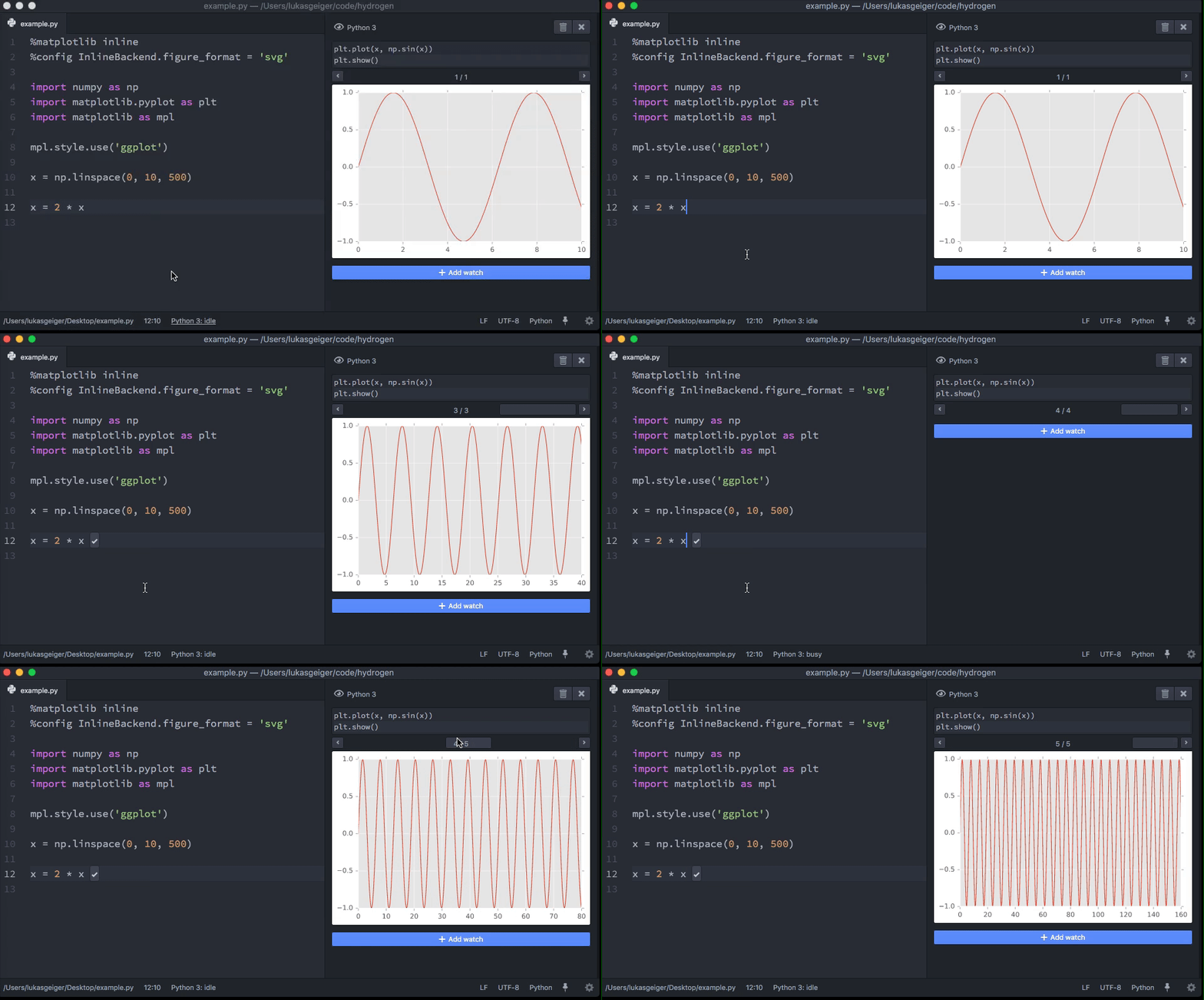
execute a line, selection, or block at a time
rich media support for plots, images, and video
watch expressions let you keep track of variables and re-run snippets after every change
completions from the running kernel, just like autocomplete in the Chrome dev tools
code can be inspected to show useful information provided by the running kernel
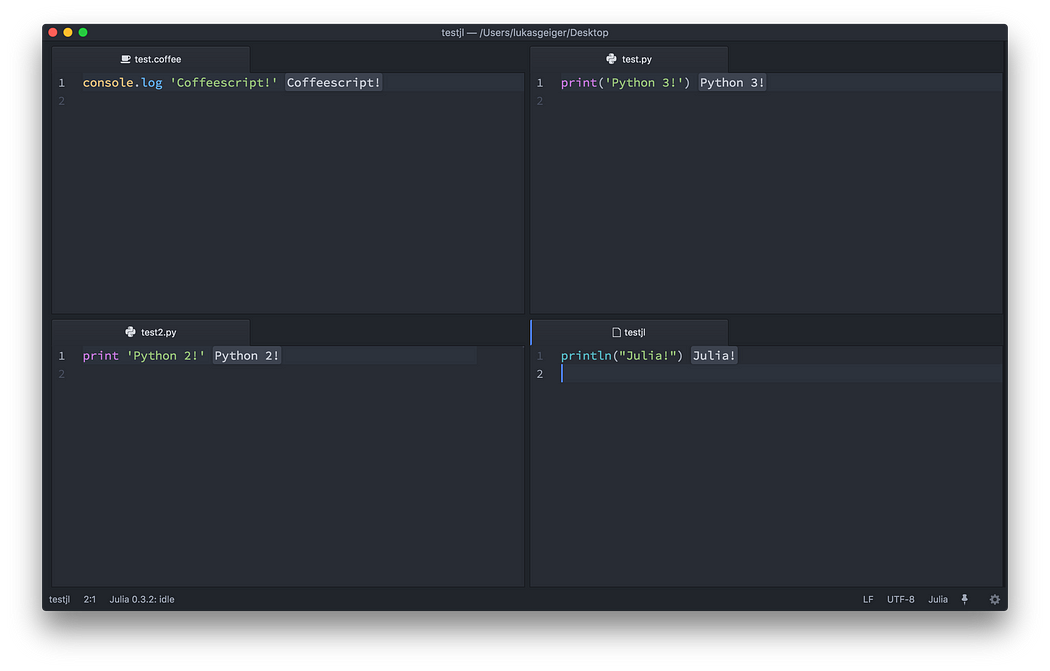
one kernel per language (so you can run snippets from several files, all in the same namespace)
interrupt or restart the kernel if anything goes wrong
use a custom kernel connection (for example to run code inside
Docker), read more in the "Custom kernel connection (inside Docker)"
section.
Plugins for Hydrogen
Hydrogen has support for plugins. Feel free to add your own to the list:
Hydrogen Launcher: launches terminals and Jupyter consoles connected to Hydrogen
Here is a list of external packages that could be useful
when using Hydrogen (without using Hydrogen plugin API, as such they're
mostly only related to the UIs):
If you find/create a package that you think can be useful
when used in combination with Hydrogen, feel free to make a PR and add
it.
How it works
Hydrogen implements the messaging protocol for Jupyter.
Jupyter (formerly IPython) uses ZeroMQ to connect a client (like
Hydrogen) to a running kernel (like IJulia or iTorch). The client sends
code to be executed to the kernel, which runs it and sends back results.
Why "Hydrogen"?
Hydrogen atoms make up 90% of Jupiter by volume.
Plus, it was easy to make a logo.
from https://github.com/nteract/hydrogen
-----------------------------------------------
Atom is sunsetted.
It is not possible to publish new packages anymore. If you have Atom
working offline locally, it should continue to work, but the servers are
down.
You can export ipynb from Hydrogen using this method and migrate to the following alternatives:
But it should work with any kernel. If you are using Hydrogen with another kernel please add it to this list or post an issue if anything is broken!
Note that if you install a new kernel, you'll need to run Hydrogen: Update Kernels for Hydrogen to find it. For performance reasons, Hydrogen only looks for available kernels when it first starts.
Troubleshooting
We have a troubleshooting guide! It's pretty sparse at the
moment, so please share with us the resolution to any rough spots that you find.
from https://github.com/nteract/hydrogen/blob/master/docs/Installation.md#installation
Hydrogen is an open source package for GitHub’s Atom text editor that allows users to run their code with an interactive REPL session with your language of choice.
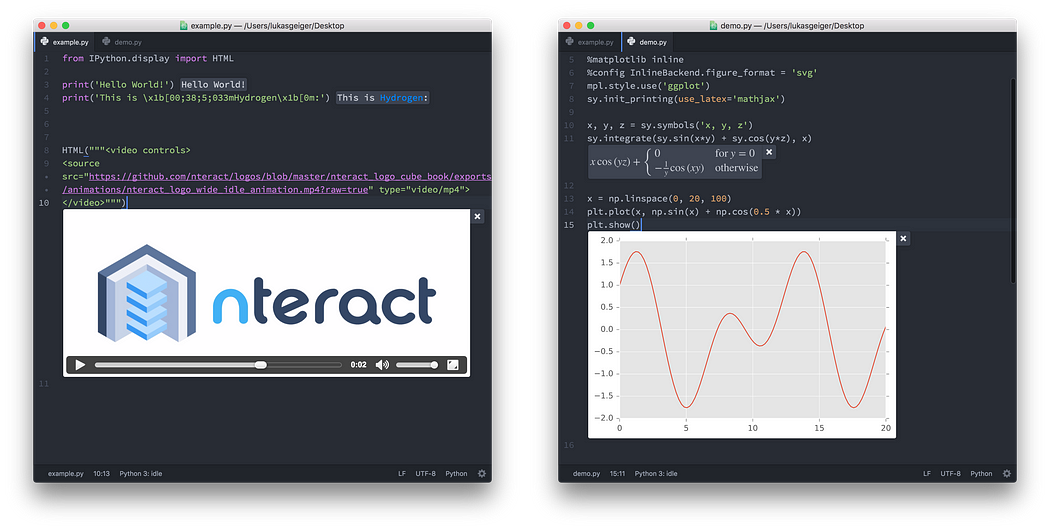
Hydrogen executing code in Atom
What does interactive coding mean?
Hydrogen
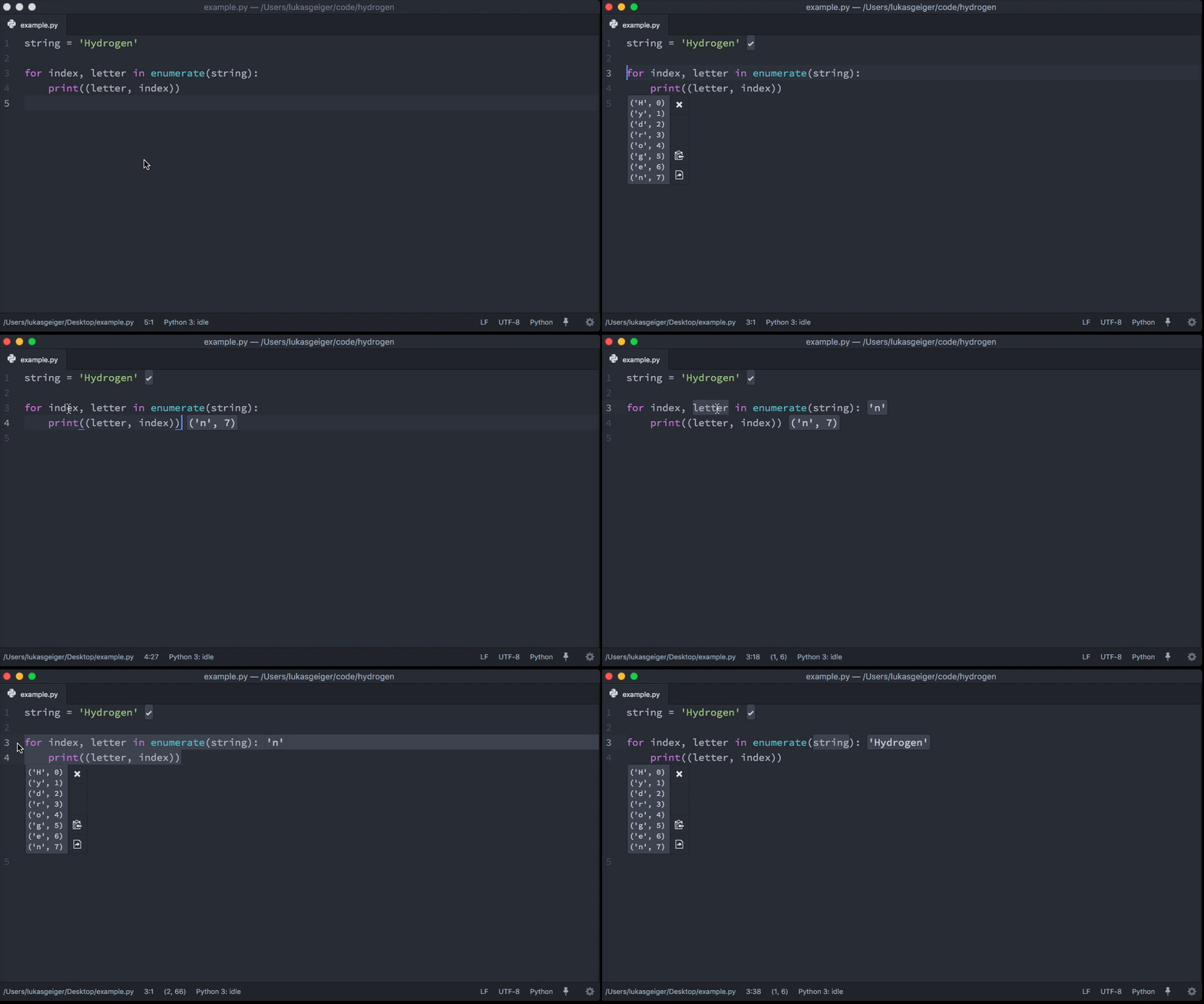
lets you choose which code to execute based on your needs. Run the
whole file, a single line, a selection, or let Hydrogen decide which
code to run based on the current cursor position.
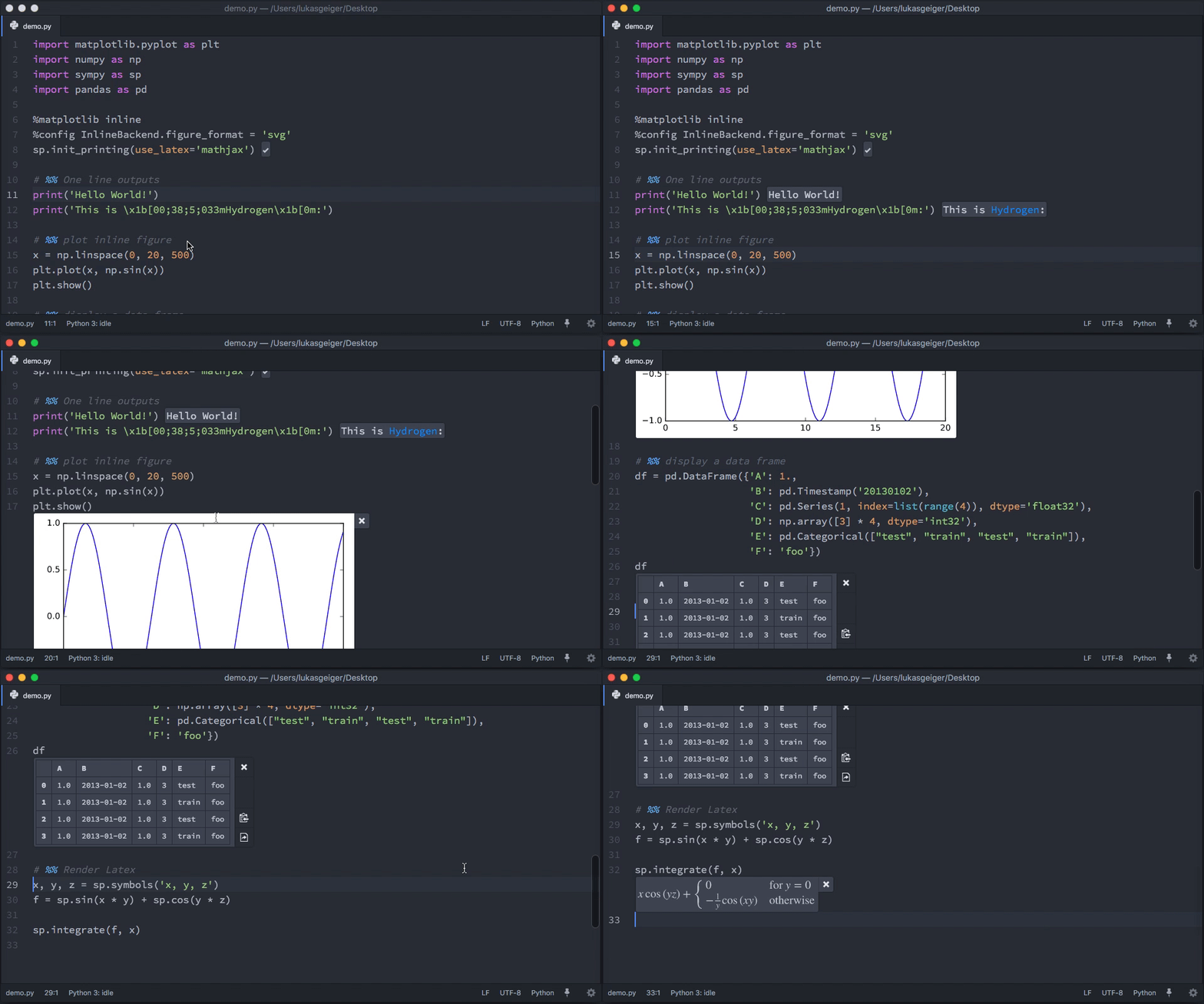
Furthermore, you can structure your code with cells like you would in a Jupyter Notebook.
The
interactivity doesn’t stop there. We support various rich media types
so your output will be rendered in the most beautiful way possible.
Hydrogen can render images, SVGs, HTML, Markdown and even LaTeX.
Code
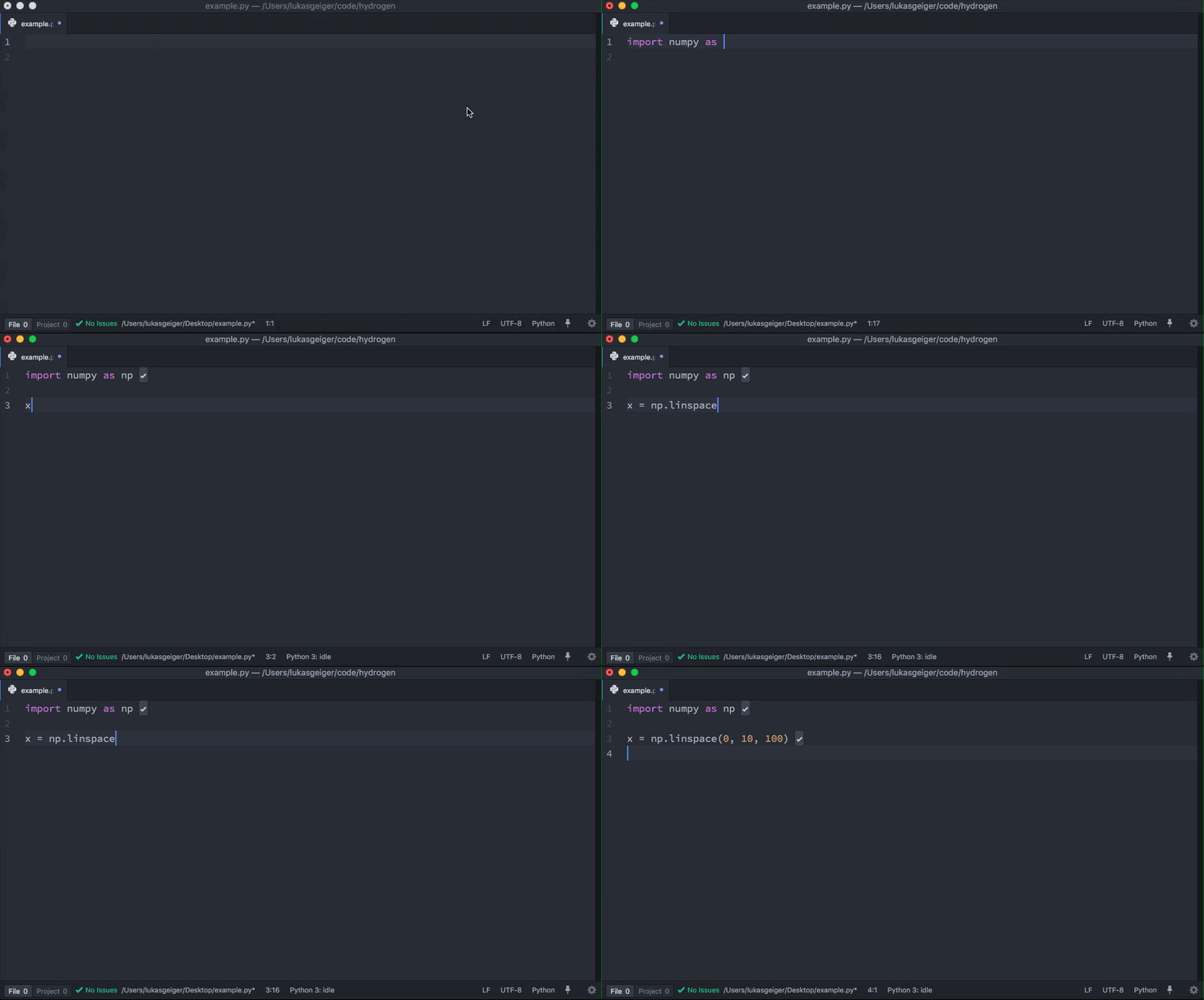
completion and a inspector for displaying metadata, like documentation,
are there to make your coding experience seamless. There’s no need to
leave your favorite text editor to get the information you need to fuel
your development process. Watch expressions are also included and
provide instant feedback on your written code every time you hit
execute.
And
last, but definitely not least, we have the ability to execute code in a
variety of languages such as Python, R, Julia, JavaScript and a lot more. You can even connect to remote kernels running inside Docker containers or on a remote server.
We want you!
Hydrogen is part of the nteract organization and we want your involvement. How can you become involved with the project?
Star the project on GitHub and share it with your social networks.
Download, use our releases, and be sure to report bugs!
Submit a pull request with a new feature or bug fix.
Present a talk on Hydrogen at a local Meetup or conference.
from https://blog.nteract.io/hydrogen-interactive-computing-in-atom-89d291bcc4dd
A curated list of awesome online implementations of Integrated Development Environments (IDE)
An (IDE)
is a software application that provides comprehensive facilities to
computer programmers for software development. This typically includes a
text editor, syntax highlighting, file explorer, debugger, version
control, and build/run/deploy options. Another defining feature of an
IDE is some form of intelligent code completion, sometimes called intellisense.
An "Online IDE" has the features mentioned above but runs in a web
browser instead of installing as a native application. An "Online IDE"
can be made accessible in offline mode without an internet connection
and still satisfy the above conditions.
StackBlitz - Run JavaScript with starting templates for Angular, React, or Ionic with full intellisense + instant error checking.
CodeSandbox
- Run JavaScript with starting templates for React, Vue, Angular,
Preact and more with full intellisense, lint error checking and live
collaborative editing.
Snack Expo - Run JavaScript with React Native in the browser and on your mobile iOS or Android.
Codeanywhere - Run many languages in a container with pre-built environment and a terminal.
WebAssembly Studio - Run C, Rust, Wat, or AssemblyScript code as WebAssembly in the browser.
Remix
- Run Solidity with a compiler, debugger, Static Analyzer for security,
and direct access to Ethereum main network and testing networks.
Nativescript Playground - Run NativeScript with Angular, JavaScript, TypeScript, or Vue.js on your mobile iOS or Android device by scanning a QR code.
Wide - Run Go with full intellisense code-completion, expression-info, and jump to declaration.
Glitch - Run full
Node.js projects with support for automating hosting, version control,
CDN for assets, secure storage of secrets, real-time collaboration, full
console access, GitHub import/export, server-side debugger, instant
deployments, and more.
Theia - Run any language on a full VM complete with a terminal built on Monaco Editor.
Datalore
- Run Python notebooks for data analysis and visualization, with
real-time collaboration, incremental calculation, and integrated version
control.
MATLAB Online - Run MATLAB code, visualize results, share scripts and collaborate on mathematical computing software.
Colaboratory - Run Python in a Jupyter notebook with ML libraries and free GPUs for running experiments.
Coder
- Run most languages on a full Linux VM complete with a terminal,
go-to-definition, linting, live collaboration, and auto-scaling.
Gitpod
- Run any language on a full Linux VM complete with terminals, GitHub
and Git integration, content assist, go-to-definition, linting, live
collaboration, custom Docker workspaces, and integrated code review
support.
Browxy - Run Java, C, C++, C#, Python, or PHP with some syntax highlighting, input arguments, and publish to a public URL.
Superblocks Lab
- Run Solidity with a built-in browser Ethereum blockchain VM, Metamask
integration (deployments to Testnet/Mainnet), transaction logger and
live code your WebApp, powered by Monaco Editor.
Codiad - Run most of languages on a self-hosted, resource-constrained server with plugins and shell execution.
Appitr - Run JavaScript ES6 with React Native in the browser built on Monaco Editor and React Native Web.
Glot - Run snippets from over 30 languages as docker containers including C#, Kotlin, Julia, Go, and Ruby.
Codiva - Run C, C++, Java snippets with background compilation and some intellisense code-completion.
Try It Online - Run snippets from over 300 languages including esoteric code-golf languages.
JDoodle - Run snippets from over 100 languages including Haskell, Prolog, MySQL, and MongoDB.
Judge0 - Run snippets from over 40 languages including Erlang, Elixir, OCaml and Octave.
Ideone - Run snippets from over 60 languages including AWK, Swift, and SQLite.
The Online Compiler - Run snippets from over 10 languages including C++, Java, Python, C# code with some intellisense code-completion.
CPP Shell - Run C++ snippets with input flags for warning level and optimization level.
Repl.it - Run snippets from over 50 languages including Clojure, Scheme, Enzyme, and Jest.
RunKit - Run Node.js snippets + visualizations but requires a sign-in.
OnlineGDB - Run snippets of C, C++, Java, Python, PHP, HTML with some intellisense code-completion.
SQLFiddle - Run snippets of MySQL, MSSQL, PostgreSQL, SQLite, and Oracle.
Go Playground - Run snippets for Go programming language.
Rust Playground - Run snippets of Rust programming language.
TypeScript Playground - Run snippets of TypeScript with tsconfig options and full intellisense.
Python Tutor
- Run snippets of Python, JavaScript, TypeScript, Java, Ruby, C, and
C++ code and see detailed step-by-step visualizations of run-time state.
Codeboard.io - Run snippets in C, C++, Eiffel, Haskell, Java, Python, and use tests for automatic grading of code written by students.
kotlin-web-demo - Run Kotlin snippets with auto-completion, type checking and automatically translate Java to Kotlin code.
3v4l PHP Playground - Run PHP snippets on 200+ versions simultaneously with VLD opcodes and performance comparison.
PasteRack - Run Racket snippets with support for sample and recent snippets.
myCompiler.io
- Run snippets from over 12 languages including C, C++, Java, Python,
Ruby, Nodejs and more with auto code-completion, syntax highlighting,
collaboration features like forking, commenting and sharing of code
snippets.
Web Snippets
CodePen - Run snippets in HTML/CSS/JS, popular with designers.