Transfer files over WiFi between your computer and your smartphone from the terminal✨
You will find the most updated version of qr-filetransfer here. But if you want the most stable version, use pip to install it
Global Install
pip3 install qr-filetransfer[extras]
Local Install
pip3 install --user qr-filetransfer[extras]
If you run into problems during the install, try removing the optional [extras] at the end of the command.
# clone the repo
$ git clone https://github.com/sdushantha/qr-filetransfer.git

# change the working directory to qr-filetransfer
$ cd qr-filetransfer

# install the requirements
$ pip3 install -r requirements.txtusage: qr-filetransfer [-h] [--debug] [--receive] [--port PORT]
[--ip_addr {192.168.0.105}] [--auth AUTH]
file_path
Transfer files over WiFi between your computer and your smartphone from the
terminal
positional arguments:
file_path path that you want to transfer or store the received
file.
optional arguments:
-h, --help show this help message and exit
--debug, -d show the encoded url.
--receive, -r enable upload mode, received file will be stored at
given path.
--port PORT, -p PORT use a custom port
--ip_addr {192.168.0.105}
specify IP address
--auth AUTH add authentication, format: username:password
--no-force-download Allow browser to handle the file processing instead of
forcing it to download.
Note: Both devices needs to be connected to the same network
Exiting
To exit the program, just press CTRL+C.
Transfer a single file
$ qr-filetransfer /path/to/file.txtTransfer a full directory. Note: the directory gets zipped before being transferred
$ qr-filetransfer /path/to/directory/Receive/upload a file from your phone to your computer
$ qr-filetransfer -r /path/to/receive/file/to/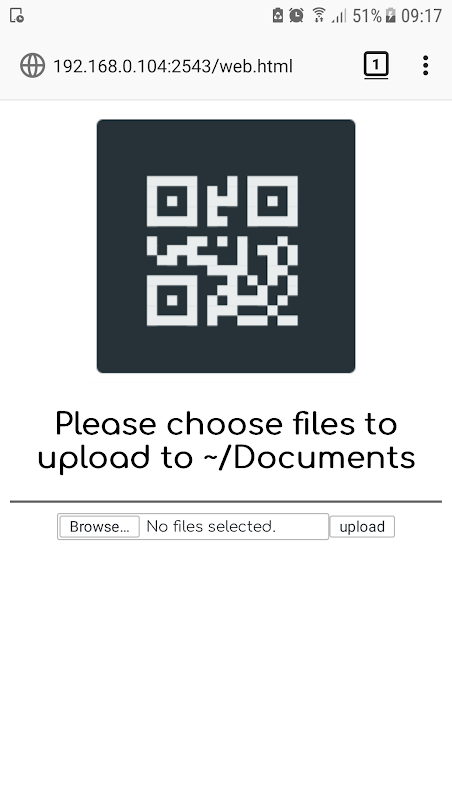
Inspired by the Go project qr-filetransfer
from
Transfer files over WiFi between your computer and your smartphone from the terminal✨
You will find the most updated version of qr-filetransfer here. But if you want the most stable version, use pip to install it
Global Install
pip3 install qr-filetransfer[extras]
Local Install
pip3 install --user qr-filetransfer[extras]
If you run into problems during the install, try removing the optional [extras] at the end of the command.
# clone the repo
$ git clone https://github.com/sdushantha/qr-filetransfer.git

# change the working directory to qr-filetransfer
$ cd qr-filetransfer

# install the requirements
$ pip3 install -r requirements.txtusage: qr-filetransfer [-h] [--debug] [--receive] [--port PORT]
[--ip_addr {192.168.0.105}] [--auth AUTH]
file_path
Transfer files over WiFi between your computer and your smartphone from the
terminal
positional arguments:
file_path path that you want to transfer or store the received
file.
optional arguments:
-h, --help show this help message and exit
--debug, -d show the encoded url.
--receive, -r enable upload mode, received file will be stored at
given path.
--port PORT, -p PORT use a custom port
--ip_addr {192.168.0.105}
specify IP address
--auth AUTH add authentication, format: username:password
--no-force-download Allow browser to handle the file processing instead of
forcing it to download.
Note: Both devices needs to be connected to the same network
Exiting
To exit the program, just press CTRL+C.
Transfer a single file
$ qr-filetransfer /path/to/file.txtTransfer a full directory. Note: the directory gets zipped before being transferred
$ qr-filetransfer /path/to/directory/Receive/upload a file from your phone to your computer
$ qr-filetransfer -r /path/to/receive/file/to/
Credits
Inspired by the Go project qr-filetransfer
from https://github.com/sdushantha/qr-filetransfer
-------
Send files over WIFI by scanning QR code in terminal
This is a fork of https://github.com/sdushantha/qr-filetransfer.
- I don't need upload and auth
- I want a shorter exe name
- I want a smaller QR code pattern
- I don't need DEFLATED when make_archive because it's inefficient
- I changed the code's filename so it makes no sense to keep upstream's commit history
- When
make_archive(), it's stored into the temp dir. So that it won't overwrite files that have the same name, and it's OK to shutdown ungracefully - Added a
create_sendto()function to add qrsend.bat to SendTo context menu, though won't work when selecting muiltiple files - Added a monkey-patch to make
http.serversupportAccept-Ranges: bytes - Added a read(shared) lock on file so that it won't be deleted while qrsend is open
pip install git+https://github.com/imba-tjd/qrsend  # pipx is preferred
qrsend file.txt/folder- In memory zip. The logic difference is too large. http.server works by reading local files. And according to the docs, ZipFile only accept path-like-obj now, rather than file-like-obj in Py2, let alone make_archive.
- Incorrect range sent by bad client, for example the requested end_bytes is larger than the actual file size.
- Files larger than 2GB won't use transmitfile. Because a single call to transmitfile fails on
cnt >= 2**31-1including setting it to 0.
Originally proposed by https://bugs.python.org/issue42643 and python/cpython#24228 but it has some fatal errors.
- not support no
<range-end> - reads all remaining content into memory in a single call
- logic error when computing the range of bytes
These has been fixed in my patch.
- I started by ignoring
end_byteand let the client to guarantee not to excessive read. Tested that curl and FF works. - I tried to use
source.truncate(). But it turns out anio.UnsupportedOperation. The reason is that truncate will modify the actual file on disk, and mode 'r' protects that. wfile._sock.sendfile()is the perfect solution, except_sockisn't public.
According to https://github.com/python/cpython/blob/main/Lib/socketserver.py, wfile is a file obj determined by wbufsize. When it == 0, wfile is_SocketWriter(added in https://bugs.python.org/issue26721), otherwise it's created bysocket.makefile(). I think HTTPServer is not likely to change wbufsize, so it's ok to use_sock.- On windows, the sendfile isn't actually the zero-copy syscall. Windows has another API that needs to be adopted via python/cpython#112337. I managed to invoke it via ctypes.
In the future, python/cpython#118949 is more likely to be merged.
from https://github.com/imba-tjd/qrsend


No comments:
Post a Comment