Total Pageviews

Showing posts with label swift. Show all posts

Sunday, 21 June 2026

CS-Notes

 编程语言语法基础与工程实践,JavaScript | Java | Python | Go | Rust | CPP | Swift 

 https://ng-tech.icu/books/ProgrammingLanguage-Series

Introduction | 前言

参考某熊的技术之路指北 中对于知识结构的划分,本仓库存放了笔者在编程语言方面学习与实践总结而来的笔记。

Programmers who program “in” a language limit their thoughts to constructs that the language directly supports. If the language tools are primitive, the programmer’s thoughts will also be primitive.

Programmers who program “into” a language first decide what thoughts they want to express, and then they determine how to express those thoughts using the tools provided by their specific language.

-- Steve McConnell’s Code Complete

程序指一组指示计算机或其他具有消息处理能力装置每一步动作的指令;代码指一套转换信息的规则系统编码。编程的本质是把我们人类想做的事情通过代码命令计算机来执行。譬如设定好了 10 个步骤,也就是 10 条指令,然后计算机通过程序计数器(时钟周期振荡器)按步骤从存放指令的内存区域一条一条取出来,扔到 CPU 执行。每条指令都有一个唯一的地址,当遇到需要选择的时候,当前指令执行完就会把下一条要执行的指令的地址返回给程序计数器。

计算机底层程序一直都是已 0 和 1 为基础执行不同的指令,而代码却一直在进化。最原始的代码其实就是计算机执行的程序,但是由于程序是指导计算机运行的,硬件处通过高低电平来处理信号再计算信息。对于机器很快就可以执行,但是对于人类来讲确异常痛苦。刚开始我记住不同组合的指令代表的意义,慢慢就发展成助记符,来表示程序,从而有了代码的概念。有了助记符很方便人类的记忆,毕竟记住一个单词比记住一串数字要好记得多。我们从最开始用一连串 0 和 1 来写指令,到后面采用了助记符,才发展成汇编语言,而随着硬件的性能提升,旧的代码语言已经无法满足人们的需求,高级语言也应运而生。

纵观计算机发展历史,软件研发效率提升就是弥合现实世界和计算机二进制世界的鸿沟。从二进制编码到汇编,到 C 语言,到面向对象的 C++、Java。编程语言随着硬件的发展变得越来越接近人类语言,语法也越来越简练;本质上不同语言最终都是被翻译成计算机自己认识的机器程序来执行。从古老的 Fortran 到现在的 Java 或者 PHP,还有其他庞大的计算机语言家族,把这些语言抽象出共性来,那么基础的语言规则都是相同的。
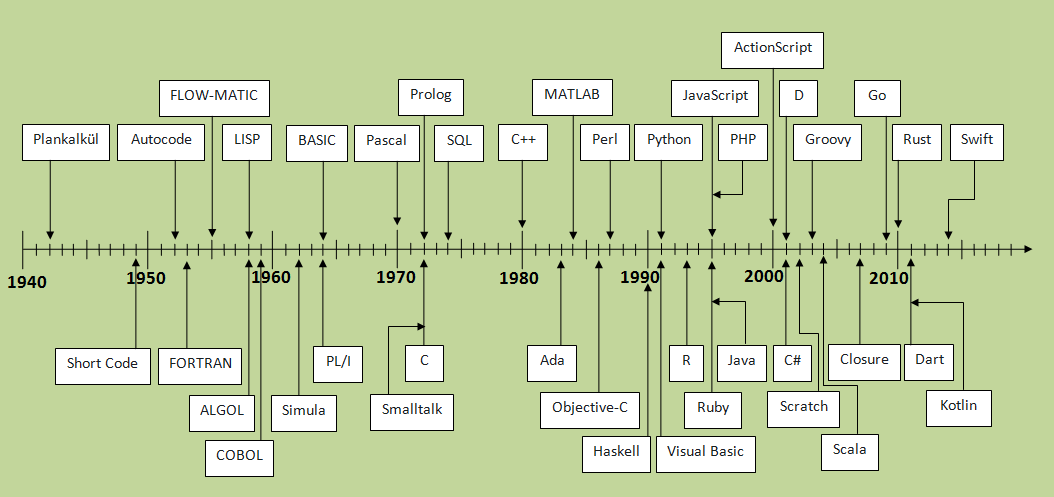
编程语言发展史

在这样一个优秀编程语言百花齐放的时代,掌握多门编程语言无疑是一件必须要做的事情。学习一门语言的基本语法并无意义,但是这是你真正了解这门语言魅力的基石。语言无论其语法之间具备多大的差异性,从 Java、C 这样严谨的语言到 Ruby ,Python, JavaScript 这样想怎么写就怎么写的脚本语言,在学习一门语言时需要知道的基本知识却是大同小异。编程语言的两大要素分别是数据类型(字符,字符串,整形,浮点型,集合等)与操作类型(顺序,判断,选择,循环,分支等)。在下面的知识脑图中,我们会了解编程语言学习中通用的知识点。

mindmap

from https://github.com/wx-chevalier/CS-Notes

Sunday, 22 February 2026

githuber.cn


感谢您的访问!GitHuber正在进行重大升级维护,预计将持续数周。在此期间登录、搜索等服务暂时关闭,星榜将不定期在此更新。有任何问题请联系邮件


状元 榜眼 探花
C Espressif Systems 云风 July Linwei 黄健宏 Lippi Leo Ma Xinchen Hui 王浩 朱天龙 (Armink)
C# Lion Jeffrey Su Paddy Xu Kerry Jiang Perfare 浅墨(毛星云) Wayne Yiming Zhao Henry topameng
C++ Hao Chen Shuo Chen Shiqi Yu vn.py yangyangwithgnu 吴祖洋 YouTuber@iTeaTime Tech Xiang Gao huihut Jack Yu
CSS 后山人 Coco Yan Zhu Vince Ruan YiFeng 布客飞龙 zhaoolee Bo Wei Xia Mr.Simple
CoffeeScript Zhuang Ma xu han Jason Lee Fred Wu onplus Michael Yin Jinzhu binnng Wei Zhu KasperDeng
Go fatedier astaxie Joe Chen chai2010 Dreamacro xtaci iikira Julien Schmidt smallnest henrylee2cn
HTML Huang Haiguang Phodal Huang 小弟调调™ 王下邀月熊 utom Xuan Huang (黄玄) lifesinger PaddingMe Zhouxuan Yang 小鱼
Java CyC2018 代码家 程序员吴师兄 张鸿洋 布兰柯基 江南一点雨 纯洁的微笑 crossoverJie macro JessYan
JavaScript 小弟调调™ Ruan YiFeng DIYgod EGOIST 贤心 Fengyuan Chen iamkun Jackson Tian cangdu lucifer
Lua AlexaZhou Zhuang Liu Linwei coder 老竭力 云风 Xavier Wang 最萌小汐 新运维社区 午夜
Matlab Shaoqing Ren Googol Lee Alfred Xiang Wu Yu Liu (Louis) Shifeng Zhang Limin Wang Zhenqiang.Ying Ying Tai(邰颖) Yihui He Zehao Huang
Objective-C ibireme M了个J YouTuber@iTeaTime Tech 高少东 Draven Aufree bang yeBlueColor Kevin Wei Wang
PHP walkor Easy 安正超 Song Summer helloqingfeng warlee John Lui dodge 韩天峰-Rango
Perl hexsum Weibin Yao(姚伟斌) Orange Carl Chen 周晶 Hui Chen Fayland Lam Hu Zhifei Simon Joey
Python 骆昊 削微寒 Mort Yao Flood Sung Sun Junyi 神奇的战士 wenxianping Yang Milo Yip Shangtong Zhang
Ruby Richard Huang DeathKing W Shao Livoras Jason Lee Lin Xiangyu Rei Xinyu Fred Wu Eric Guo
Scala Liwei Lin smallnest Wang Zhe 涂名雷 Bo Xu oldpig Liang Depeng Sidney Xu Yang, Bo Cheng Lian
Shell 花果山大圣 hackerxu Teddysun Jimmy Song EtherDream 233boy Judas.n Linwei ZhangJun snowdream
Swift Wei Wang iPader Lex Tang Allen Wang Caldis_Chen zhuhaow Wenchao Ding John Lui Vincent Li 100mango
VimL yangyangwithgnu Maple zc he Barret李靖 Barry Arthur Rykk Juvenn Woo luofei Wang Shidong brookhong
  • 排名以GitHub官方数据作为唯一权威来源
  • 排名以开发者在某编程语言上的所有项目(repo)所收获的星星(star)总数为序
  • 项目的编程语言以GitHub认定的主要编程语言为准,这适用于使用了多种编程语言的项目
更新于2024-12-23 14:16:05 +0800 
 
from  https://githuber.cn

Tuesday, 25 February 2025

苹果宣布开源Xcode开发工具构建引擎Swift Build


遵守Apache License 2.0开源协议。Swift Build负责将开发者创建的源代码和项目描述转换为应用程序、库和命令行工具等可交付的输出产品。作为基础设施组件,Swift Build不仅能够执行来自更高级客户端的构建请求(如Swift Package Manager和Xcode),还提供了针对Linux和Windows平台的支持。Swift Build与Swift编译器无缝集成,支持多种产品类型的构建,并且能够在构建Swift和C代码时,最大化并行性,提高工作流程效率。

源代码:https://github.com/swiftlang/swift-build

-------

A high-level build system based on llbuild, used by Xcode, Swift Playground, and the Swift Package Manager 

Swift Build

Swift Build is a high-level build system based on llbuild with great support for building Swift. It is used by Xcode to build Xcode projects and Swift packages, and by Swift Playground. It can also be used as the Swift Package Manager build system in preview form when passing --build-system swiftbuild.

Usage

With SwiftPM

When building SwiftPM from sources which include Swift Build integration, passing --build-system swiftbuild will enable the new build-system. This functionality is not currently available in nightly toolchains.

With Xcode

Changes to swift-build can also be tested in Xcode using the launch-xcode command plugin provided by the package. Run swift package --disable-sandbox launch-xcode from your checkout of swift-build to launch a copy of the currently xcode-selected Xcode.app configured to use your modified copy of the build system service. This workflow is generally only supported when using the latest available Xcode version.

With xcodebuild

Changes to swift-build can also be tested in xcodebuild using the run-xcodebuild command plugin provided by the package. Run swift package --disable-sandbox run-xcodebuild from your checkout of swift-build to run xcodebuild from the currently xcode-selected Xcode.app configured to use your modified copy of the build system service. Arguments followed by -- will be forwarded to xcodebuild unmodified. This workflow is generally only supported when using the latest available Xcode version.

Debugging

When using the Xcode or xcodebuild workflows above, you can easily set breakpoints and debug. First, open the swift-build package containing your changes in Xcode and choose the "Debug > Attach to Process by PID or Name…" menu item. In the panel that appears, type "SWBBuildServiceBundle" as the process name and click "Attach". The debugger will wait for the process to launch. Run the relevant command shown above to launch Xcode or xcodebuild, and once you open a workspace the swift-build process will launch and the debugger will attach to it automatically.

Documentation

SwiftBuild.docc contains additional technical documentation.

To view the documentation in browser, run the following command at the root of the project:

docc preview SwiftBuild.docc

On macOS, use:

xcrun docc preview SwiftBuild.docc


from https://github.com/swiftlang/swift-build

Thursday, 5 December 2024

awesome-swiftui

 Awesome resources, articles, libraries about SwiftUI.

Awesome SwiftUI Awesome

General

Apple

WWDC

Newsletter

  • SwiftUI Weekly - The curated collection of links about SwiftUI. Delivered every Monday
  • iOS Dev Weekly - Curated by Dave Verwer and published every Friday
  • iOS Goodies - weekly iOS newsletter curated by Marius Constantinescu

Book

  • Thinking in SwiftUI - It is not a reference for SwiftUI’s platform-specific APIs, but rather a guide to honing your intuition about how SwiftUI works.
  • SwiftUI by Tutorials - Build fluid and engaging declarative UI for your apps with way less coding with SwiftUI! SwiftUI by Tutorials
  • Mastering SwiftUI by AppCoda - We will dive deep into the SwiftUI framework, teaching you how to work with various UI elements, and build different types of UIs

Course

  • SwiftUI for iOS 14 - Build a multi-platform app from scratch using the new techniques in iOS 14. We'll use the Sidebar and Lazy Grids to make the layout adaptive for iOS, iPadOS, macOS Big Sur
  • SwiftUI Handbook - A comprehensive series of tutorials covering Xcode, SwiftUI and all the layout and development techniques
  • SwiftUI Layout explained - We decided to go one step further, and reimplement SwiftUI’s layout system, along with the layout behavior of many built-in views

Learning

  • 100 days of SwiftUI - Free collection of videos, tutorials, tests, and more, all drawn from around the work on Hacking with Swift
  • About-SwiftUI - Gathering all info published, both by Apple and by others, about new framework SwiftUI.
  • SwiftUI - Examples projects using SwiftUI released by WWDC2019. Include Layout, UI, Animations, Gestures, Draw and Data.
  • SwiftUI-Cheat-Sheet - SwiftUI 2.0 Cheat Sheet
  • F* SwiftUI - A curated list of questions and answers about SwiftUI.
  • The SwiftUI Lab - Advanced insights into SwiftUI
  • Netsplit SwiftUI
  • SwiftUI by examples - SwiftUI by Example is the world's largest collection of SwiftUI examples, tips, and techniques giving you over 400 pages of hands-on code
  • A Companion for SwiftUI - A Companion for SwiftUI is an app that documents all the SwiftUI views, shapes, protocols, scenes and property wrappers for the iOS and macOS platform.
  • SwiftUI-Kit - A SwiftUI system components and interactions demo app
  • CodeSlicing - Create things in SwiftUI

Articles

Build

Internal

Layout

Life cycle

Others

macOS

Libraries

Extensions

  • SwiftUIX - An extension to the standard SwiftUI library.
  • EasySwiftUI - Extra sugar for SwiftUI
  • SwiftUIKitView - Easily use UIKit views in your SwiftUI applications. Create Xcode Previews for UIView elements
  • PureSwiftUI - Bringing Views into Focus

Image

  • SDWebImageSwiftUI - About SwiftUI Image loading and Animation framework powered by SDWebImage
  • FetchImage - Makes it easy to download images using Nuke and display them in SwiftUI apps
  • Kingfisher - A lightweight, pure-Swift library for downloading and caching images from the web.

Tools

Inspection

  • ViewInspector - Runtime inspection and unit testing of SwiftUI views
  • SwiftUI-Introspect - About Introspect underlying UIKit components from SwiftUI
  • Dynamic - Call hidden/private API in style! The Swift way.

Property wrappers

  • Burritos - A collection of Swift Property Wrappers

UI

Animation

Button

  • FloatingButton - Easily customizable floating button menu created with SwiftUI

Calendar

Chart

  • ChartView - ChartView made in SwiftUI
  • SwiftUICharts - A simple line and bar charting library that supports accessibility written using SwiftUI.
  • SwiftSunburstDiagram - SwiftUI library to easily render diagrams given a tree of objects. Similar to ring chart, sunburst chart, multilevel pie chart.
  • swiftui-charts - SwiftUI Charts with custom styles
  • BarChart - SwiftUI Bar Chart
  • GraphKit - Graphing library for SwiftUI
  • LightChart SwiftUI charts

Color

  • DynamicColor - Yet another extension to manipulate colors easily in Swift and SwiftUI

Clock

Countdown

Confetti

Drawer

  • Snap - A customizable Snapping Drawer à la Apple Maps
  • swiftui-drawer - A SwiftUI bottom-up controller, like in the Maps app. Drag to expand or minimize.

Form

Grid

  • Grid - The most powerful Grid container missed in SwiftUI
  • QGrid - QGrid: The missing SwiftUI collection view
  • WaterfallGrid - A waterfall grid layout view for SwiftUI
  • swiftui-grid - SwiftUI Grid layout with custom style
  • ASCollectionView - A SwiftUI collection view with support for custom layouts, preloading, and more
  • MosaicGrid - Easy to use fully customizable Mosaic grid layout for SwiftUI

Icon

Guide

  • StepperView - SwiftUI iOS component for Step Indications.

Keyboard

  • KeyboardShortcuts - Add user-customizable global keyboard shortcuts to your macOS app in minutes

Loading

Onboarding

Page

  • Pages - A lightweight, paging view solution for SwiftUI
  • LiquidSwipe - Example of using SwiftUI to create a beautiful Liquid Swipe control
  • PageView - SwiftUI view enabling navigation between pages of content

Picker

Pull to refresh

Slider

  • swiftui-sliders - SwiftUI Sliders with custom styles
  • Sliders-SwiftUI - Collection of unique fully customizable SwiftUI sliders, joysticks, trackpads and more!

TabBar

Toast

  • SSToastMessage - It will add toast, alert, and floating message view over the top of any view.
  • ToastUI - A simple way to show toast in SwiftUI.
  • AlertToast - Present Apple-like alert & toast in SwiftUI

View

  • liquid Create a playful backsplash in SwiftUI.

Window

  • SwiftUIWindowStyles - Showcase of window and toolbar style combinations possible with SwiftUI on macOS.

Others

  • MGFlipView - MGFlipView allows to create flipping view in easy way without worrying about flipping animation and flipping logic.
  • LiquidSwipe - Example of using SwiftUI to create a beautiful Liquid Swipe control
  • neumorphic - Neumorphic is a SwiftUI utility to build Neumorphism Soft UI
  • SwiftUI-Shapes - Commonly Used Shapes and Utilities In SwiftUI
  • SwiftUI-Hook - A SwiftUI implementation of React Hooks. Enhances reusability of stateful logic and gives state and lifecycle to function view.
  • ParticleDrivers - ParticleDrivers is a SwiftUI project that simulates particles forming structures on command
  • liquid - Create a playful backsplash in SwiftUI
  • shiny - Shiny uses your gyroscope to simulate lighting and motion effects on colors. Works on almost every SwiftUI View.

Open source apps

iOS

macOS

  • RedditOS - SwiftUI Reddit client for macOS Big Sur
  • ControlRoom - A macOS app to control the Xcode Simulator
  • AppShot - App Store screen shot generator
  • 5 GUIs - Detect the GUI technology used in an app
  • Pasteboard Viewer - View what's on the pasteboard
  • pika - An open-source colour picker app for macOS
  • nuage - A native SoundCloud app for macOS, written in SwiftUI
  • writefreely - Source code for the WriteFreely SwiftUI app for iOS, iPadOS, and macOS
  • Privacy Redirect for Safari - Redirect Twitter, YouTube, Reddit, Google Maps, Google Search, and Google Translate to privacy friendly alternatives.

MultiPlatform Applications

  • DEV - SwiftUI + Composable Architecture multiplatform app for dev.to website.
  • StackOv - An open-source SwiftUI Stack Overflow client

from  https://github.com/onmyway133/awesome-swiftui

Saturday, 26 October 2024

Publish ,一个专门为 Swift 开发者构建的静态站点生成器


它由 John Sundell 创建并维护,旨在提供一个简单、易用且可定制的方式来生成静态内容。

Publish 的主要特点和功能包括:

  • 静态站点生成:Publish 允许开发者使用 Swift 语言构建静态站点和博客。它可以将文章、页面和其他内容转换为静态 HTML 文件,以便在任何支持静态文件托管的环境中部署和发布。
  • Markdown 支持:Publish 支持使用 Markdown 语法编写内容。Markdown 是一种简单而直观的标记语言,使得编写文章和格式化内容变得简单和易读。
  • 可定制主题:Publish 提供了可定制的主题功能,使你能够根据自己的需求定制和设计网站的外观和样式。你可以选择现有的主题或者开发自己的主题。
  • 集成的插件系统:Publish 提供了一个插件系统,允许开发者扩展和定制框架的功能。你可以使用现有的插件或开发自己的插件来增强静态站点的功能和特性。
  • 支持元数据和标签:Publish 支持在文章和页面中添加元数据和标签,使你能够对内容进行分类、标记和检索。
  • 代码高亮和多媒体支持: Publish 集成了代码高亮和多媒体支持功能,使你能够以优雅的方式展示代码示例和嵌入多媒体内容。

需要注意的是,Publish 是一个用 Swift 编写的静态站点生成框架,因此在使用之前,你需要具备 Swift 编程的基础知识。它提供了一种简单而灵活的方式来构建个人博客、文档网站、项目页面等静态站点,并具有可定制的主题和插件系统,使你能够根据自己的需求进行定制和扩展。

您可以查看它的官网GitHub了解更多。


Thursday, 17 October 2024

awesome-saas-boilerplates


Flutter (Dart)

Jetpack Compose (Kotlin)

iOS (Swift / SwiftUI)

Ruby on Rails

Vue

Node.js (Javascript)

Laravel (PHP)

NestJs (Typescript)

Symfony (PHP)

SvelteKit (Javascript)

WordPress (PHP)

Django (Python)

Flask (Python)

FastAPI (Python)

.NET (ASP.NET Core / .NET 6+)

Java

Go

Next.js

React Native

Plasmo (React)

Rare

Remix

Ionic Framework

AWS

Firebase

from https://github.com/smirnov-am/awesome-saas-boilerplates
