An open-source, lightweight note-taking solution. The pain-less way to create your meaningful notes. Your Notes, Your Way.

An open-source, self-hosted note-taking solution designed for seamless deployment and multi-platform access. Experience effortless plain text writing with pain-free, complemented by robust Markdown syntax support for enhanced formatting.
Home Page • Blogs • Docs • Live Demo


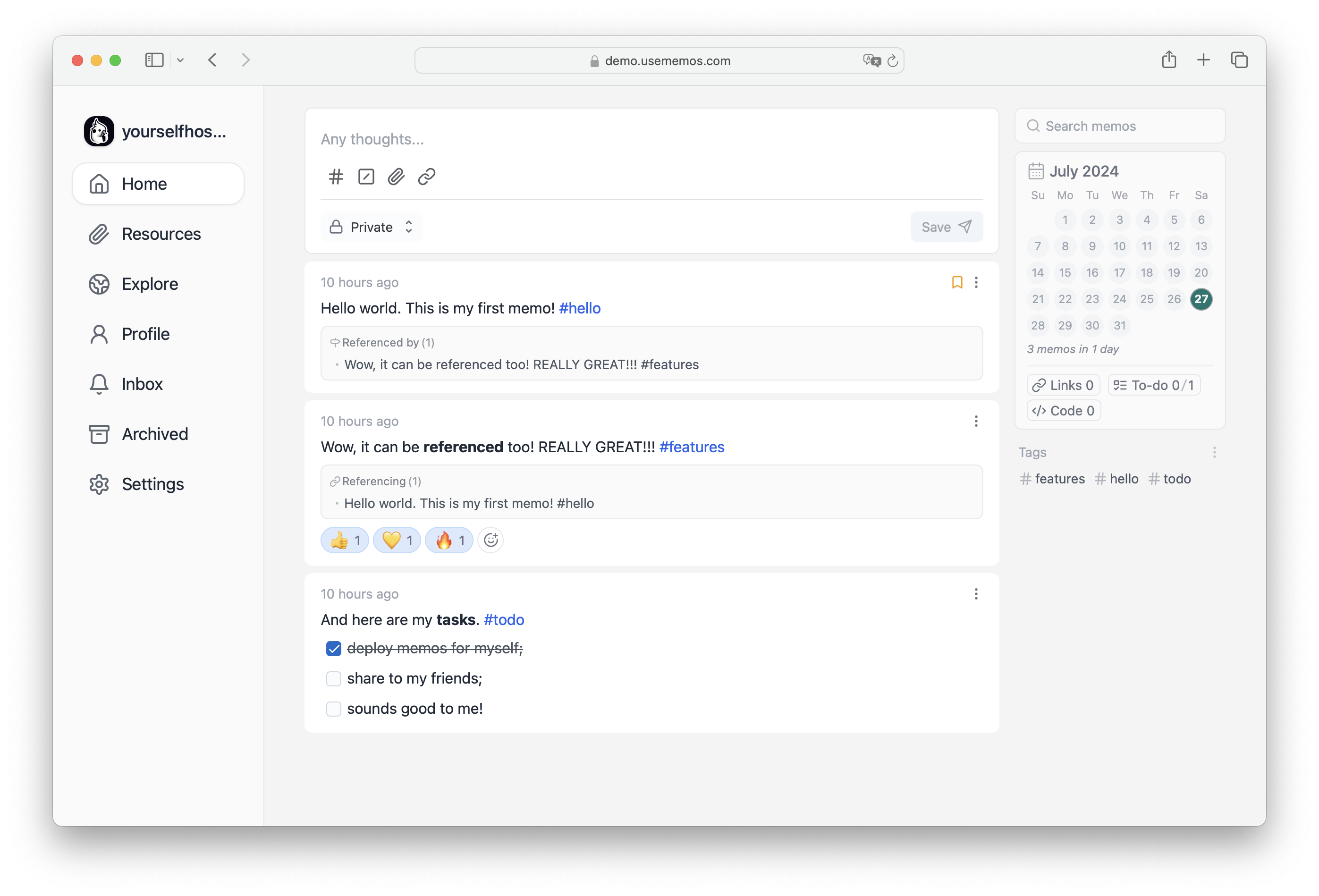
- Privacy First 🏠: Take control of your data. All runtime data is securely stored in your local database.
- Create at Speed ✍️: Save content as plain text for quick access, with Markdown support for fast formatting and easy sharing.
- Lightweight but Powerful 🤲: Built with Go, React.js, and a compact architecture, our application delivers powerful performance in a lightweight package.
- Customizable 🧩: Easily customize your server name, icon, description, system style, and execution scripts to make it uniquely yours.
- Open Source 🦦: Memos embraces the future of open source, with all code available on GitHub for transparency and collaboration.
- Free to Use 💸: Enjoy all features completely free, with no charges ever for any content.
docker run -d --name memos -p 5230:5230 -v ~/.memos/:/var/opt/memos neosmemo/memos:stableNote
This command is only applicable for Unix/Linux systems. For Windows, please refer to the detailed documentation.
The ~/.memos/ directory will be used as the data directory on your local machine, while /var/opt/memos is the directory of the volume in Docker and should not be modified.
Learn more about other installation methods.
https://github.com/usememos/memos/tree/main
--------------------------------------------------------------
Development Setup
Set up a local development environment for contributing to Memos or building custom features.
This guide will help you set up a complete development environment for Memos, whether you want to contribute to the project or build custom features.
Prerequisites
Required Software
- Go 1.21+ - Download Go
- Node.js 18+ - Download Node.js
- npm/yarn/pnpm - Package manager (pnpm recommended)
- Git - Download Git
Optional Tools
- Docker - For containerized development
- Make - For build automation
- Air - For hot reloading Go applications
System Requirements
- OS: Linux, macOS, or Windows
- RAM: 4GB minimum, 8GB recommended
- Storage: 2GB free space
Source Code Setup
Clone Repository
# Clone the main repository
git clone https://github.com/usememos/memos.git
cd memos

# Or fork and clone your fork
git clone https://github.com/YOUR_USERNAME/memos.git
cd memos

# Add upstream remote (if forked)
git remote add upstream https://github.com/usememos/memos.git
Project Structure
Understanding the project structure:
memos/
├── cmd/                    # Application entry points
├── internal/              # Private application code
│   ├── server/           # HTTP server and routes
│   ├── store/            # Data access layer
│   └── util/             # Utility functions
├── web/                   # Frontend code
│   ├── src/              # React source code
│   └── dist/             # Built frontend assets
├── scripts/              # Build and utility scripts
├── test/                 # Test files
├── docs/                 # Documentation
└── Dockerfile            # Container definition
Backend Development
Go Environment Setup
- Verify Go installation:
go version- Install development dependencies:
# Install Air for hot reloading
go install github.com/cosmtrek/air@latest

# Install golangci-lint for linting
curl -sSfL https://raw.githubusercontent.com/golangci/golangci-lint/master/install.sh | sh -s -- -b $(go env GOPATH)/bin v1.54.2
Database Setup
SQLite (Default)
No additional setup needed. SQLite database will be created automatically.
PostgreSQL (Recommended for Development)
# Install PostgreSQL
brew install postgresql          # macOS
sudo apt install postgresql     # Ubuntu
sudo yum install postgresql     # CentOS

# Start PostgreSQL service
brew services start postgresql  # macOS
sudo systemctl start postgresql # Linux

# Create development database
createdb memos_dev

# Create test database
createdb memos_test
Environment Configuration
Create development configuration:
# Copy example environment file
cp .env.example .env

# Edit configuration
cat > .env << EOF
MEMOS_MODE=dev
MEMOS_PORT=8080
MEMOS_DATA=./dev_data
MEMOS_DRIVER=postgres
MEMOS_DSN=postgresql://localhost:5432/memos_dev?sslmode=disable
EOF
Build and Run
Manual Build
# Build backend
./scripts/build.sh

# Run development server
./build/memos --mode dev
Hot Reloading with Air
# Create Air configuration
cat > .air.toml << EOF
root = "."
testdata_dir = "testdata"
tmp_dir = "tmp"

[build]
  args_bin = []
  bin = "./tmp/main"
  cmd = "go build -o ./tmp/main ./cmd/memos"
  delay = 1000
  exclude_dir = ["assets", "tmp", "vendor", "web/dist"]
  exclude_file = []
  exclude_regex = ["_test.go"]
  exclude_unchanged = false
  follow_symlink = false
  full_bin = ""
  include_dir = []
  include_ext = ["go", "tpl", "tmpl", "html"]
  kill_delay = "0s"
  log = "build-errors.log"
  send_interrupt = false
  stop_on_root = false

[color]
  app = ""
  build = "yellow"
  main = "magenta"
  runner = "green"
  watcher = "cyan"

[log]
  time = false

[misc]
  clean_on_exit = false
EOF

# Start with hot reloading
air
Frontend Development
Node.js Environment
- Navigate to web directory:
cd web- Install dependencies:
# Using pnpm (recommended)
pnpm install

# Using npm
npm install

# Using yarn
yarn install
Development Server
# Start frontend development server
pnpm dev

# Or with npm/yarn
npm run dev
yarn dev
The frontend will be available at http://localhost:3000 and proxy API requests to the backend.
Frontend Structure
web/
├── src/
│   ├── components/       # React components
│   ├── pages/           # Page components
│   ├── stores/          # State management
│   ├── types/           # TypeScript types
│   ├── utils/           # Utility functions
│   └── styles/          # CSS/SCSS files
├── public/              # Static assets
└── package.json         # Dependencies
Full Stack Development
Concurrent Development
Run both backend and frontend in development mode:
# Terminal 1 - Backend with hot reload
air

# Terminal 2 - Frontend with hot reload
cd web && pnpm dev
from https://usememos.com/docs/installation/development---------------------------------------------------------------
related post:
https://briteming.blogspot.com/2023/03/memos.html


No comments:
Post a Comment