代理服务器(Proxy Server)是工作在浏览器与http服务器之间的一个服务应用,所有经过代理服务器的http请求,都会被转发到对应的http服务器上。
当然,除了http可以使用代理外,https、ftp、RTSP、pop3等协议同样可以使用代理访问,不过本文介绍的是支持http、https协议访问的代理。
一、代理服务器分类:
我们比较常用、支持http(s)协议代理主要分为两大类:http代理和socks代理,见下表:| 大类 | 小类 | 子类 | 描述 |
|---|---|---|---|
| http代理 | http代理 https代理 | 透明代理 | http服务器知道浏览器端使用了代理,并能获取浏览器端原始IP; |
| 匿名代理 | http服务器知道浏览器端使用了代理,但无法获取浏览器端原始IP; | ||
| 高匿名代理 | http服务器不知道浏览器端使用了代理,且无法获取浏览器端原始IP; | ||
| SOCKS代理 | SOCKS4 | 被称为全能代 理,支持http 和其他协议 | 只支持TCP应用; |
| SOCKS4A | 支持TCP应用;支持服务器端域名解析; | ||
| SOCKS5 | 支持TCP和UDP应用;支持服务器端域名解析; 支持多种身份验证;支持IPV6; |
二、Linux curl命令代理设置参数:
linux curl命令可以使用下面参数设置http(s)代理、socks代理,已经设置它们的用户名、密码以及认证方式:| 参数 | 用法 |
|---|---|
| -x host:port -x [protocol://[user:pwd@]host[:port] --proxy [protocol://[user:pwd@]host[:port] | 使用HTTP代理访问;如果未指定端口,默认使用8080端口; protocol默认为http_proxy,其他可能的值包括: http_proxy、HTTPS_PROXY、socks4、socks4a、socks5; 如: --proxy 8.8.8.8:8080; -x "http_proxy://aiezu:123@aiezu.com:80" |
| --socks4 <host[:port]> --socks4a <host[:port]> --socks5 <host[:port]> | 使用SOCKS4代理; 使用SOCKS4A代理; 使用SOCKS5代理; 此参数会覆盖“-x”参数; |
| --proxy-anyauth --proxy-basic --proxy-diges --proxy-negotiate --proxy-ntlm | 代理认证方式,参考: --anyauth --basic --diges --negotiate --ntlm |
| -U <user:password> --proxy-user <user:password> | 设置代理的用户名和密码; |
三、Linux curl命令设置代理举例:
1、linux curl命令设置http代理:
1 2 3 4 5 6 7 8 9 10 11 12 13 14 15 16 17 18 19 20 | # 指定http代理IP和端口curl -x 113.185.19.192:80 http://aiezu.com/test.phpcurl --proxy 113.185.19.192:80 http://aiezu.com/test.php#指定为http代理curl -x http_proxy://113.185.19.192:80 http://aiezu.com/test.php#指定为https代理curl -x HTTPS_PROXY://113.185.19.192:80 http://aiezu.com/test.php#指定代理用户名和密码,basic认证方式curl -x aiezu:123456@113.185.19.192:80 http://aiezu.com/test.phpcurl -x 113.185.19.192:80 -U aiezu:123456 http://aiezu.com/test.phpcurl -x 113.185.19.192:80 --proxy-user aiezu:123456 http://aiezu.com/test.php#指定代理用户名和密码,ntlm认证方式curl -x 113.185.19.192:80 -U aiezu:123456 --proxy-ntlm http://aiezu.com/test.php#指定代理协议、用户名和密码,basic认证方式curl -x http_proxy://aiezu:123456@113.185.19.192:80 http://aiezu.com/test.php |
2、Linux curl命令设置socks代理:
1 2 3 4 5 6 7 8 9 10 11 12 13 14 | #使用socks4代理,无需认证方式curl --socks4 122.192.32.76:7280 http://aiezu.com/test.phpcurl -x socks4://122.192.32.76:7280 http://aiezu.com/test.php#使用socks4a代理,无需认证方式curl --socks4a 122.192.32.76:7280 http://aiezu.com/test.phpcurl -x socks4a://122.192.32.76:7280 http://aiezu.com/test.php#使用socks5代理,basic认证方式curl --socks5 122.192.32.76:7280 -U aiezu:123456 http://aiezu.com/test.phpcurl -x socks5://aiezu:123456@122.192.32.76:7280 http://aiezu.com/test.php#使用socks5代理,basic认证方式,ntlm认证方式curl -x socks5://aiezu:123456@122.192.32.76:7280 --proxy-ntlm http://aiezu.com/test.php |
四、测试代理的隐匿度:
1、测试前准备:
测试前,我们先在网站根目录也一个php页面“test.php”,用于输出http服务器接收到的访客IP地址信息,"test.php"测试页的代码如下:1 2 3 4 5 6 7 8 9 | <?php$array = array('HTTP_USER_AGENT', 'HTTP_HOST', 'HTTP_ACCEPT', 'PATH', 'SERVER_SIGNATURE', 'SERVER_SOFTWARE', 'SERVER_NAME', 'SERVER_ADDR', 'SERVER_PORT', 'DOCUMENT_ROOT', 'SERVER_ADMIN', 'SCRIPT_FILENAME', 'REMOTE_PORT', 'GATEWAY_INTERFACE', 'SERVER_PROTOCOL', 'REQUEST_METHOD', 'QUERY_STRING', 'REQUEST_URI', 'SCRIPT_NAME', 'PHP_SELF', 'REQUEST_TIME');// 将 $_SERVER 数组赋予 $srv数组;$srv = $_SERVER;// 释放掉 $srv中不相关的键foreach($array as $name ) { unset($srv[ $name ]);}print_r($srv); |
2、测试使用不同代理输出结果:
①. 通过linux curl不使用代理访问:1 2 3 4 5 | [root@aiezu.com ~]# curl http://aiezu.com/test.phpArray( [REMOTE_ADDR] => 114.112.104.126) |
②. 通过linux curl命令使用http透明代理访问:
1 2 3 4 5 6 7 8 9 | [root@aiezu.com ~]# curl -x 37.139.9.11:80 http://aiezu.com/test.phpArray( [HTTP_VIA] => 1.1 ThunderVPN (squid/3.3.8) [HTTP_X_FORWARDED_FOR] => 114.112.104.126 [HTTP_CACHE_CONTROL] => max-age=259200 [HTTP_CONNECTION] => keep-alive [REMOTE_ADDR] => 37.139.9.11) |
③. 通过linux curl命令使用http匿名代理访问:
1 2 3 4 5 6 | [root@aiezu.com ~]# curl -x 60.21.209.114:8080 http://aiezu.com/test.phpArray( [HTTP_PROXY_CONNECTION] => Keep-Alive [REMOTE_ADDR] => 60.21.209.114) |
④. 通过linux curl命令使用http高匿名代理访问:
1 2 3 4 5 | [root@aiezu.com ~]# curl -x 114.232.1.13:8088 http://aiezu.com/test.phpArray( [REMOTE_ADDR] => 114.232.1.13) |
④. 通过linux curl命令使用socks5代理访问:
1 2 3 4 5 | [root@aiezu.com ~]# curl --socks5 122.192.32.76:7280 http://aiezu.com/test.phpArray( [REMOTE_ADDR] => 180.96.54.198) |
curl命令详解
curl提供了一大堆非常有用的功能,包括代理访问、用户认证、ftp上传下载、HTTP POST、SSL连接、cookie支持、断点续传...。
一、curl命令语法:
二、curl命令参数详解:
由于linux curl功能十分强大,所以命令参数十分多,下表只是爱E族(aiezu.com)帅选出来的部分参数,更多参数请运行“man curl”命令查看。
| 参数组 | 参数 | 描述 |
|---|---|---|
| url | url | 需要抓取的一到多个URLs; 多个下面通配符的方式: 1、http://{www,ftp,mail}.aiezu.com; 2、http://aiezu.com/images/[001-999].jpg; 3、http://aiezu.com/images/[1-999].html; 4、ftp://aiezu.com/file[a-z].txt |
| 请 求 头 | -H "name: value" --header "name: value" | (HTTP)添加一个http header(http请求头); |
| -H "name:" --header "name:" | (HTTP)移除一个http header(http请求头); | |
| -A "string" --user-agent "string" 【参考】 | (HTTP)设置Http请求头“User-Agent”,服务器通过“User-Agent”可以判断客户端使用的浏览器名称和操作系统类型,伪造此参数能导致服务器做出错误判断。 也可以使用“-H”, “--header option”设置此选项; | |
| -e <URL> --referer <URL> 【参考】 | (HTTP)设置访问时的来源页面,告诉http服务从哪个页面进入到此页面; -e "aiezu.com"相当于“-H "Referer: www.qq.com"”; | |
| 响 应 头 | -I --head | (HTTP)只输出HTTP-header,不获取内容(HTTP/FTP/FILE)。 用于HTTP服务时,获取页面的http头; (如:curl -I http://aiezu.com) 用于FTP/FILE时,将会获取文件大小、最后修改时间; (如:curl -I file://test.txt) |
| -i --include | (HTTP)输出HTTP头和返回内容; | |
| -D <file> --dump-header <file> | (HTTP)转储http响应头到指定文件; | |
| cookie | -b name=data --cookie name=data 【参考】 | (HTTP)发送cookie数据到HTTP服务器,数据格式为:"NAME1=VALUE1; NAME2=VALUE2"; 如果行中没有“=”,将把参数值当作cookie文件名; 这个cookie数据可以是由服务器的http响应头“Set-Cookie:”行发送过来的; |
| -c filename --cookie-jar file name 【参考】 | (HTTP)完成操作后将服务器返回的cookies保存到指定的文件; 指定参数值为“-”将定向到标准输出“如控制台”; | |
| -j --junk-session-cookies | (HTTP)告诉curl放弃所有的"session cookies"; 相当于重启浏览器; | |
| 代理 | -x host:port -x [protocol://[user:pwd@]host[:port] --proxy [protocol://[user:pwd@]host[:port] 【参考】 | 使用HTTP代理访问;如果未指定端口,默认使用8080端口; protocol默认为http_proxy,其他可能的值包括: http_proxy、HTTPS_PROXY、socks4、socks4a、socks5; 如: --proxy 8.8.8.8:8080; -x "http_proxy://aiezu:123@aiezu.com:80" |
| -p --proxytunnel | 将“-x”参数的代理,作为通道的方式去代理非HTTP协议,如ftp; | |
| --socks4 <host[:port]> --socks4a <host[:port]> --socks5 <host[:port]> 【参考】 | 使用SOCKS4代理; 使用SOCKS4A代理; 使用SOCKS5代理; 此参数会覆盖“-x”参数; | |
| --proxy-anyauth --proxy-basic --proxy-diges --proxy-negotiate --proxy-ntlm | http代理认证方式,参考: --anyauth --basic --diges --negotiate --ntlm | |
| -U <user:password> --proxy-user <user:password> | 设置代理的用户名和密码; | |
| 数据 传输 | -G --get 【参考】 | 如果使用了此参数,“-d/”、“--data”、“--data-binary”参数设置的数据,讲附加在url上,以GET的方式请求; |
| -d @file -d "string" --data "string" --data-ascii "string" --data-binary "string" --data-urlencode "string" 【参考】 | (HTTP)使用HTTP POST方式发送“key/value对”数据,相当于浏览器表单属性(method="POST",enctype="application/x-www-form-urlencoded") -d,--data:HTTP方式POST数据; --data-ascii:HTTP方式POST ascii数据; --data-binary:HTTP方式POST二进制数据; --data-urlencode:HTTP方式POST数据(进行urlencode); 如果数据以“@”开头,后紧跟一个文件,将post文件内的内容; | |
| -F name=@file -F name=<file -F name=content --form name=content 【参考】 | (HTTP)使用HTTP POST方式发送类似“表单字段”的多类型数据,相当于同时设置浏览器表单属性(method="POST",enctype="multipart/form-data"),可以使用此参数上传二进制文件。 如果字段内容以“@”开头,剩下的部分应该是文件名,curl将会上传此文件,如: curl -F "pic=@pic.jpg" http://aiezu.com; curl -F "page=@a.html;type=text/html" http://aiezu.com curl -F "page=@/tmp/a;filename=a.txt" http://aiezu.com 如果字段内容以“<”开头,剩下的部分应该是文件名,curl将从文件中获取作为此字段的值,如:curl -F "text=<text.txt" http://aiezu.com; | |
| --form-string <key=value> | (HTTP)类似于“--form”,但是“@”、“<”无特殊含义; | |
| -T file --upload-file file | 通过“put”的方式将文件传输到远程网址; 选项参数只使用字符"-",将通过stdin读入文件内容; 如: cat test.txt|curl "http://aiezu.com/a.php" -T - curl "http://aiezu.com/a.php" -T - <test.txt 此参数也可以使用通配符: curl -T "{file1,file2}" http://aiezu.com curl -T "img[1-1000].png" http://aiezu.com | |
| 断点 续传 | -C <offset> --continue-at <offset> | 断点续转,从文件头的指定位置开始继续下载/上传; offset续传开始的位置,如果offset值为“-”,curl会自动从文件中识别起始位置开始传输; |
| -r <range> --range <range> | (HTTP/FTP/SFTP/FILE) 只传输内容的指定部分: 0-499:最前面500字节; -500:最后面500字节; 9500-:最前面9500字节; 0-0,-1:最前面和最后面的1字节; 100-199,500-599:两个100字节; | |
认证 | --basic | (HTTP)告诉curl使用HTTP Basic authentication(HTTP协议时),这是默认认证方式; |
| --ntlm | (HTTP)使用NTLM身份验证方式,用于HTTP协议; 一般用于IIS使用NTLM的网站; | |
| --digest | (HTTP)使用HTTP Digest authentication加密,用于HTTP协议; 配合“-u/--user”选项,防止密码使用明文方式发送; | |
| --negotiate | (HTTP)使用GSS-Negotiate authentication方式,用于HTTP协议; 它主要目的是为它的主要目的是为kerberos5认证提供支持支持; | |
| --anyauth | (HTTP)告诉curl自动选择合适的身份认证方法,并选用最安全的方式; | |
| -u user:password --user user:password | 使用用户名、密码认证,此参数会覆盖“-n”、“--netrc”和“--netrc-optional”选项; 如果你只提供用户名,curl将要求你输入密码; 如果你使用“SSPI”开启的curl库做“NTLM”认证,可以使用不含用户名密码的“-u:”选项,强制curl使用当前登录的用户名密码进行认证; 此参数相当于设置http头“Authorization:”; | |
| 证书 | -E <证书[:密码]> --cert <证书[:密码]> | (SSL)指定“PEM”格式的证书文件和证书密码; |
| --cert-type <type> | (SSL)告诉curl所提供证书的类型:PEM、DER、ENG等; 默认为“PEM”; | |
| --cacert <CA证书> | (SSL)告诉curl所以指定的CA证书文件,必须是“PEM”格式; | |
| --capath <CA证书路径> | (SSL)告诉curl所以指定目录下的CA证书用来验证; 这些证书必须是“PEM”格式; | |
| --crlfile <file> | (HTTPS/FTPS)提供一个PEM格式的文件,用于指定被吊销的证书列表; | |
| -k --insecure | (SSL)设置此选项将允许使用无证书的不安全SSL进行连接和传输。 | |
| SSL 其他 | --ciphers <list of ciphers> | (SSL)指定SSL要使用的加密方式;如:“aes_256_sha_256”; |
| --engine <name> | 设置一个OpenSSL加密引擎用于加密操作; 使用“curl --engine list”查看支持的加密引擎列表; | |
| --random-file | (SSL)指定包含随机数据的文件路径名;数据是用来为SSL连接产生随机种子为; | |
| --egd-file <file> | (SSL)为随机种子生成器EGD(Entropy Gathering Daemon socket)指定的路径名; | |
| -1/--tlsv1 --tlsv1.0 --tlsv1.1 --tlsv1.2 -2/--sslv2 -3/--sslv3 | (SSL)使用TLS版本2与远程服务器通讯; (SSL)使用TLS 1.0版本与远程服务器通讯; (SSL)使用TLS 1.1版本与远程服务器通讯; (SSL)使用TLS 1.2版本与远程服务器通讯; (SSL)使用SSL版本2与远程服务器通讯; (SSL)使用SSL版本3与远程服务器通讯; | |
| 私钥 公钥 | --key <key> | (SSL/SSH)指定一个私钥文件名;为指定时自动尝试使用下面文件:“~/.ssh/id_rsa”、“~/.ssh/id_dsa”、“./id_rsa'”、 “./id_dsa”; |
| --key-type <type> | (SSL)指定私钥文件类型,支持:DER、PEM、ENG,默认是PEM; | |
| --pass <phrase> | (SSL/SSH)指定私钥文件的密码; | |
| --pubkey <key> | (SSH)使用指定文件提供的您公钥; | |
| FTP | -P --ftp-port <接口> | (FTP)FTP主动模式时,设置一个地址等待服务器的连接,如: 网卡:eth1 IP:8.8.8.8 主机名:aiezu.com 可以加端口号:eth1:20000-21000; |
| --crlf | (FTP)上传时将换行符(LF)转换为回车换行(CRLF); | |
| --ftp-account [data] | (FTP)ftp帐号信息; | |
| --ftp-method [method] | (FTP)可选值:multicwd/nocwd/singlecwd; | |
| --ftp-pasv | (FTP)使用使用PASV(被动)/EPSV模式; | |
| --ftp-skip-pasv-ip | (FTP)使用PASV的时,跳过指定IP; | |
| --ftp-create-dirs | (FTP)上传时自动创建远程目录; | |
| -l --list-only | (FTP)列出ftp文件列表; | |
| -B --use-ascii | (FTP/LDAP)使用Ascii传输模式,用于FTP、LDAP;在ftp中相当与使用了“type=A;”模式。 | |
| --disable-epsv | (FTP)告诉curl在PASV(被动模式)时不要使用EPSV; | |
| --disable-eprt | (FTP)告诉curl在主动模式时禁用EPRT和LPRT; | |
| 限速 | --limit-rate <speed> | 限制curl使用的最大带宽;如果未指定单位,默认单位为“bytes/秒”,你也可以指定单位为“K”、“M”、“G”等单位,如:“--limit-rate 1m”为限制最大使用带宽为“1m字节/秒”; |
| -y --speed-time <time> | If a download is slower than speed-limit bytes per second during a speed-time period, the download gets aborted. If speed-time is used, the default speed-limit will be 1 unless set with -Y. This option controls transfers and thus will not affect slow connects etc. If this is a concern for you, try the --connect-timeout option. | |
| -Y --speed-limit <speed> | If a download is slower than this given speed (in bytes per second) for speed-time seconds it gets aborted. speed-time is set with -y and is 30 if not set. | |
| 其他 选项 | -0/--http1.0 | (HTTP) 强制curl使用HTTP 1.0而不是使用默认的HTTP 1.1; |
| --interface <name> | 使用指定的网卡接口访问; curl --interface eth0 http://aiezu.com curl --interface 10.0.0.101 http://aiezu.com | |
| -X <command> --request <command> | (HTTP)指定与服务器通信使用的请求方法,如:GET、PUT、POST、DELETE等,默认GET; | |
| --keepalive-time <seconds> | 设置keepalive时间 | |
| --no-keepalive | 关闭keepalive功能; | |
| --no-buffer | 禁用对输出流缓冲; | |
| --buffer | 启用输出流缓冲; | |
| -L --location | (HTTP/HTTPS)追随http响应头“Location:”定向到跳转后的页面; (在http响应码为3XX时使用,如301跳转、302跳转) | |
| --location-trusted | (HTTP/HTTPS)同“--location”,但跳转后会发送跳转前的用户名和密码; | |
| --compressed | (HTTP)请求对返回内容使用压缩算法进行压缩;curl支持对gzip压缩进行解压; | |
| --connect-timeout <seconds> | 指定最大连接超时,单位“秒”; | |
| -m seconds --max-time seconds | 限制整个curl操作的最长时间,单位为秒; | |
| -s --silent | 安静模式。不要显示进度表或错误消息; | |
| -# --progress-bar | 显示进度条; | |
| 错误 选项 | -f --fail | (HTTP)连接失败时(400以上错误)不返回默认错误页面,而是返回一个curl错误码“22”; |
| --retry <num> --retry-delay <seconds> --retry-max-time <seconds> | 失败重试次数; 重试间隔时间; 最大重试时间; | |
| -S --show-error | 安静模式下显示错误信息; | |
| --stderr <file> | 错误信息保存文件; | |
| 输出 | -o file --output file | 将返回内容输出到文件。 如果是用过通配符获取多个url,可以使用“#”后跟“数字序号”,curl会自动将它替换对应的关键词,如: curl "http://aiezu.com/{a,b}.txt" -o "#1.txt"; 将保存为:“a.txt”,“b.txt”; curl "http://aiezu.com/{a,b}_[1-3].txt" -o "#1#2.txt"; 将保存为:a1.txt、a2.txt、a3.txt、b1.txt、b2.txt、b3.txt 如果要根据规则创建保存目录,参考:“--create-dirs” 指定“-”将定向到标准输出“如控制台”; |
| -O --remote-name | 将返回内容输出到当前目录下,和url中文件名相同的文件中(不含目录); | |
| --create-dirs | 与“-o”参数配合使用,创建必要的本地目录层次结构 | |
| -w --write-out format | 操作完成后在返回信息尾部追加指定的内容;要追加的内容可以是一个字符串“string”、从文件中获取“@filename”、从标准输入中获取“@-” 格式参数中可以用%{variable_name} 方式使用响应信息的相关变量,如:%{content_type}、%{http_code}、%{local_ip}...,更多变量参考“man curl”获取; 格式参数可以使用“\n”、“\r”、“\t”等转义字符; | |
| 调试 | --trace <file> | 转储所有传入和传出的数据到文件,包括描述信息; 使用“-”作为文件名将输出发送到标准输出。 |
| --trace-ascii file | 转储所有传入和传出的数据到文件,包括描述信息,只转储ASCII部分,更容易阅读; 使用“-”作为文件名将输出发送到标准输出。 这个选项会覆盖之前使用的-v、 --verbose、 --trace-ascii选项; | |
| --trace-time | 转储文件中添加时间信息; | |
| -K --config <config file> | 从配置文件中读取参数,参考:http://curl.haxx.se/docs/ | |
| -v --verbose | 显示更详细的信息,调试时使用; | |
| 帮助 | -M --manual | 显示完整的帮助手册; |
| -h --help |
from http://aiezu.com/article/linux_curl_command.html
----
如何让 curl 命令通过代理访问
我的系统管理员给我提供了如下代理信息:
IP: 202.54.1.1Port: 3128Username: fooPassword: bar
该设置在 Google Chrome 和 Firefox 浏览器上很容易设置。但是我要怎么把它应用到 curl 命令上呢?我要如何让 curl 命令使用我在 Google Chrome 浏览器上的代理设置呢?
很多 Linux 和 Unix 命令行工具(比如 curl 命令,wget 命令,lynx 命令等)使用名为 http_proxy,https_proxy,ftp_proxy 的环境变量来获取代理信息。它允许你通过代理服务器(使用或不使用用户名/密码都行)来连接那些基于文本的会话和应用。
本文就会演示一下如何让 curl 通过代理服务器发送 HTTP/HTTPS 请求。
让 curl 命令使用代理的语法
语法为:
## Set the proxy address of your uni/company/vpn network ##export http_proxy=http://your-ip-address:port/## http_proxy with username and passwordexport http_proxy=http://user:password@your-proxy-ip-address:port/## HTTPS version ##export https_proxy=https://your-ip-address:port/export https_proxy=https://user:password@your-proxy-ip-address:port/
另一种方法是使用 curl 命令的 -x 选项:
curl -x <[protocol://][user:password@]proxyhost[:port]> url--proxy <[protocol://][user:password@]proxyhost[:port]> url--proxy http://user:password@Your-Ip-Here:Port url-x http://user:password@Your-Ip-Here:Port url
在 Linux 上的一个例子
首先设置 http_proxy:
## proxy server, 202.54.1.1, port: 3128, user: foo, password: bar ##export http_proxy=http://foo:bar@202.54.1.1:3128/export https_proxy=$http_proxy## Use the curl command ##curl -I https://www.cyberciti.bizcurl -v -I https://www.cyberciti.biz
输出为:
* Rebuilt URL to: www.cyberciti.biz/* Trying 202.54.1.1...* Connected to 1202.54.1.1 (202.54.1.1) port 3128 (#0)* Proxy auth using Basic with user 'foo'> HEAD HTTP://www.cyberciti.biz/ HTTP/1.1> Host: www.cyberciti.biz> Proxy-Authorization: Basic x9VuUml2xm0vdg93MtIz> User-Agent: curl/7.43.0> Accept: */*> Proxy-Connection: Keep-Alive>< HTTP/1.1 200 OKHTTP/1.1 200 OK< Server: nginxServer: nginx< Date: Sun, 17 Jan 2016 11:49:21 GMTDate: Sun, 17 Jan 2016 11:49:21 GMT< Content-Type: text/html; charset=UTF-8Content-Type: text/html; charset=UTF-8< Vary: Accept-EncodingVary: Accept-Encoding< X-Whom: Dyno-l1-com-cyberX-Whom: Dyno-l1-com-cyber< Vary: CookieVary: Cookie< Link: <http://www.cyberciti.biz/wp-json/>; rel="https://api.w.org/"Link: <http://www.cyberciti.biz/wp-json/>; rel="https://api.w.org/"< X-Frame-Options: SAMEORIGINX-Frame-Options: SAMEORIGIN< X-Content-Type-Options: nosniffX-Content-Type-Options: nosniff< X-XSS-Protection: 1; mode=blockX-XSS-Protection: 1; mode=block< X-Cache: MISS from server1X-Cache: MISS from server1< X-Cache-Lookup: MISS from server1:3128X-Cache-Lookup: MISS from server1:3128< Connection: keep-aliveConnection: keep-alive<* Connection #0 to host 10.12.249.194 left intact
本例中,我来下载一个 pdf 文件:
$ export http_proxy="vivek:myPasswordHere@10.12.249.194:3128/"$ curl -v -O http://dl.cyberciti.biz/pdfdownloads/b8bf71be9da19d3feeee27a0a6960cb3/569b7f08/cms/631.pdf
也可以使用 -x 选项:
curl -x 'http://vivek:myPasswordHere@10.12.249.194:3128' -v -O https://dl.cyberciti.biz/pdfdownloads/b8bf71be9da19d3feeee27a0a6960cb3/569b7f08/cms/631.pdf
输出为:
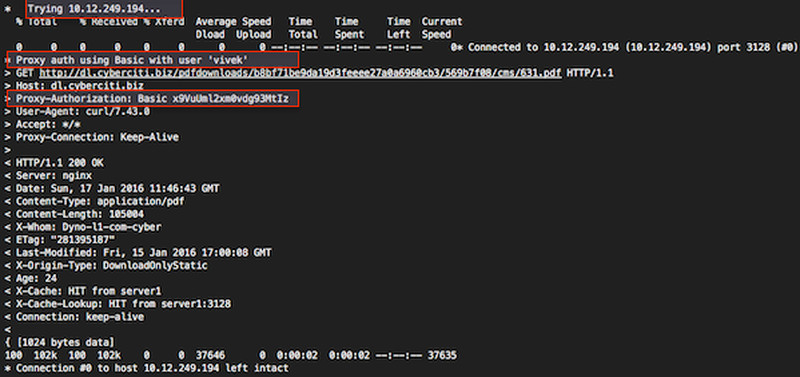
Fig.01:curl in action \(click to enlarge\)
Unix 上的一个例子
$ curl -x http://prox_server_vpn:3128/ -I https://www.cyberciti.biz/faq/howto-nginx-customizing-404-403-error-page/
socks 协议怎么办呢?
语法也是一样的:
curl -x socks5://[user:password@]proxyhost[:port]/ urlcurl --socks5 192.168.1.254:3099 https://www.cyberciti.biz/
如何让代理设置永久生效?
编辑 ~/.curlrc 文件:
$ vi ~/.curlrc
添加下面内容:
proxy = server1.cyberciti.biz:3128proxy-user = "foo:bar"
保存并关闭该文件。另一种方法是在你的 ~/.bashrc 文件中创建一个别名:
## alias for curl command## set proxy-server and port, the syntax is## alias curl="curl -x {your_proxy_host}:{proxy_port}"alias curl = "curl -x server1.cyberciti.biz:3128"
记住,代理字符串中可以使用 protocol:// 前缀来指定不同的代理协议。使用 socks4://,socks4a://,socks5://或者 socks5h:// 来指定使用的 SOCKS 版本。若没有指定协议或者使用 http:// 表示 HTTP 协议。若没有指定端口号则默认为 1080。-x 选项的值要优先于环境变量设置的值。若不想走代理,而环境变量总设置了代理,那么可以通过设置代理为空值("")来覆盖环境变量的值。详细信息请参阅 curl 的 man 页 。
via: https://www.cyberciti.biz/faq/linux-unix-curl-command-with-proxy-username-password-http-options/
from https://linux.cn/article-9223-1.html
-----
https://oxylabs.io/blog/curl-with-proxy
https://droidyue.com/blog/2021/07/07/set-proxy-for-curl/


No comments:
Post a Comment