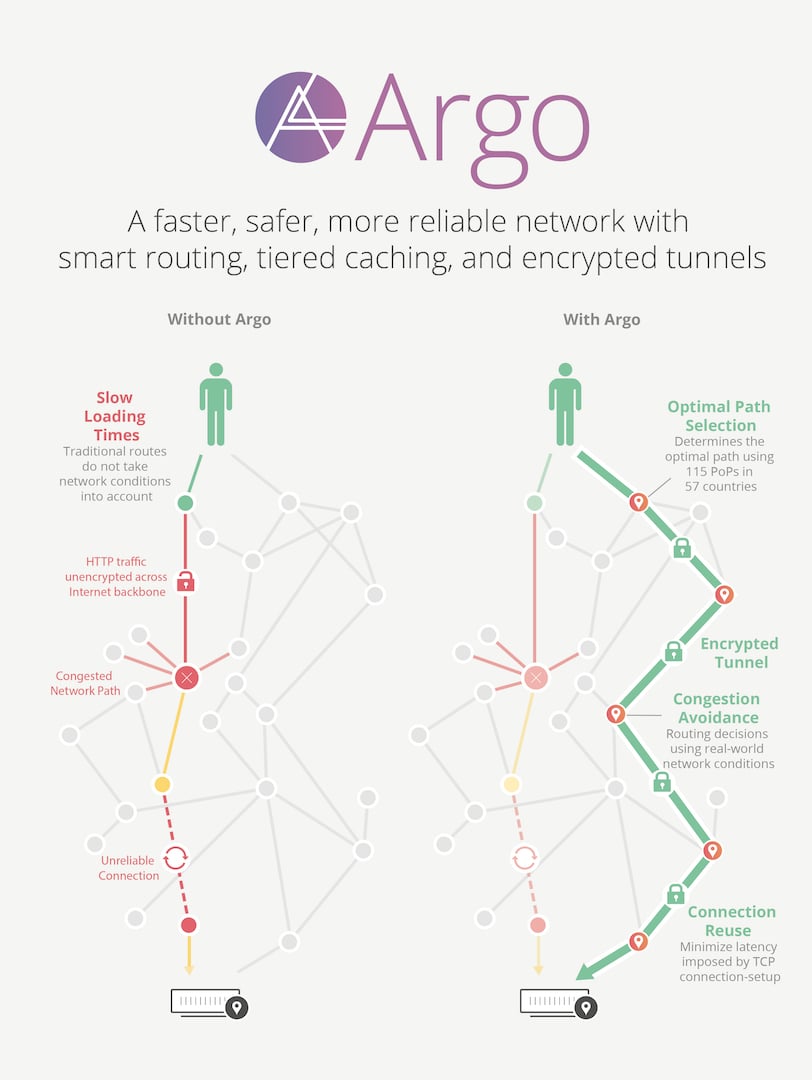
Today, to fix all of this, Cloudflare is launching Argo, a “virtual backbone” for the modern Internet. Argo analyzes and optimizes routing decisions across the global Internet in real-time. Think Waze, the automobile route optimization app, but for Internet traffic.
Just as Waze can tell you which route to take when driving by monitoring which roads are congested or blocked, Argo can route connections across the Internet efficiently by avoiding packet loss, congestion, and outages.
Cloudflare’s Argo is able to deliver content across our network with dramatically reduced latency, increased reliability, heightened encryption, and reduced cost vs. an equivalent path across the open Internet. The results are impressive: an average 35% decrease in latency, a 27% decrease in connection errors, and a 60% decrease in cache misses. Websites, APIs, and applications using Argo have seen bandwidth bills fall by more than half and speed improvements end users can feel.
Argo is a central nervous system for the Internet, processing information from every request we see to determine which routes are fast, which are slow, and what the optimum path from visitor to content is at that given moment. Through Cloudflare’s 115 PoPs and 6 million domains, we see every ISP and every user of the Internet pass through our network. The intelligence from this gives us a billion eyes feeding information about brownouts, faults, and packet loss globally.
Today, Argo includes two core features: Smart Routing and Tiered Cache. All customers can enable Argo today in the Traffic app in the dashboard. Argo is priced at $5/domain monthly, plus $0.10 per GB of transfer from Cloudflare to your visitors.

Argo Smart Routing
Networks on the Internet rely on legacy technologies like BGP to propagate and calculate routes from network to network, ultimately getting you from laptop-on-couch to video-on-YouTube. BGP has been around for decades, and was not designed for a world with malicious or incompetent actors lurking at every network hop.In one comical example from 2008, a Pakistani ISP turned a botched censorship order into a global YouTube outage, bringing the fragility of core Internet routing algorithms into the public eye. In the same situation, Argo Smart Routing would detect which transit providers had valid routes to YouTube and which did not, keeping end user experience fast, reliable, and secure.
Metcalfe’s Law states that the value of a network is defined by the square of the number of nodes that make up the network. The existing Internet is incredibly valuable because of the number and diversity of nodes connected to the network. Unfortunately, this makes it difficult to pick up and start over; no Internet started from scratch, with sounder routing and traffic management, would come close to delivering the value provided by the current incarnation without a similar network footprint.
Because of our physical and virtual presence around the world, Cloudflare is uniquely positioned to rebuild the core of the Internet. Every customer we bring on increases the size of our network and the value of that network to each of our customers. Argo is Metcalfe’s Law brought to life.
Argo Smart Routing uses latency and packet loss data collected from each request that traverses our network to pick optimal paths across the Internet. Using this latency data, we’re able to determine which of our transit providers are performing best between any two points on the planet. Cloudflare now sees about 10% of all HTTP/HTTPS requests on the Internet. With Argo, each of those requests is providing the insight necessary to speed up all of its peers.
CC BY 2.0 image by Steve Jurvetson
Enabling Argo (and Smart Routing with it) results in breathtaking reductions in latency. As an example, OKCupid enabled Argo and immediately saw a 36% decrease in request latency, as measured by TTFB (Time To First Byte). Without Argo, requests back to the origin from a Cloudflare PoP traverse the public Internet, subject to vagaries of routers, cables, and computers they will touch on their journey. With Argo, requests back to the origin are tunneled over our secure overlay network, on a path to the origin we've learned the performance of from all the requests that have traversed before it.
Transit over the public Internet is like driving with paper maps; it usually works, but using a modern navigation system that takes current traffic conditions into account will almost always be faster.
Routing over intelligently determined paths also results in significant reliability gains. Argo picks the fastest, most reliable route to the origin, which means routing around flapping links and routers that refuse to do their job. In a real-world illustration of these reliability gains, OKCupid saw a 42% drop in the number of connection timeouts on their site with Argo enabled.
It’s not just OKCupid that’s happy with Argo. 50,000 customers, large and small, have been beta testing Argo over the last 12 months. On average, these Argo Smart Routing beta customers saw a 35% decrease in latency and a 27% decrease in connection timeouts.
Argo Tiered Cache
Argo Tiered Cache uses the size of our network to reduce requests to customer origins by dramatically increasing cache hit ratios. By having 115 PoPs around the world, Cloudflare caches content very close to end users, but if a piece of content is not in cache, the Cloudflare edge PoP must contact the origin server to receive the cacheable content. This can be slow and places load on an origin server compared to serving directly from cache.Argo Tiered Cache lowers origin load, increases cache hit ratios, and improves end user experience by first asking other Cloudflare PoPs if they have the requested content when a cache miss occurs. This results in improved performance for visitors, because distances and links traversed between Cloudflare PoPs are generally shorter and faster than the links between PoPs and origins. It also reduces load on origins, making web properties more economical to operate. Customers enabling Argo can expect to see a 60% reduction in their cache miss rate as compared to Cloudflare’s traditional CDN service.
Argo Tiered Cache also concentrates connections to origin servers so they come from a small number of PoPs rather than the full set of 115 PoPs. This results in fewer open connections using server resources. In our testing, we've found many customers save more on their cloud hosting bills than Argo costs, because of reduced bandwidth usage and fewer requests to the origin. This makes the service a “no brainer” to enable.
Additional Benefits
In addition to performance and reliability gains, Argo also delivers a more secure online experience. All traffic between Cloudflare data centers is protected by mutually authenticated TLS, ensuring any traffic traversing the Argo backbone is protected from interception, tampering, and eavesdropping.With Argo, we’ve rebuilt things at the very core of the Internet, the algorithms that figure out where traffic should flow and how. We’ve done all this without any disruption to how the Internet works or how applications behave.
Cloudflare has built a suite of products to address lots of pains on the Internet. Argo is our newest offering.
Go ahead and enable it — you’ll find it in the Traffic tab in your dashboard.
PS. Interested in working on Argo? Drop us a line!
---------------
ARGO 隧道 多协议一键脚本
项目地址:
https://github.com/tao-t356/vless-xhttp-reality-self
VLESS + HY2 + AnyTLS + SS2022 + Argo 一键脚本:
bash <(curl -fsSL https://raw.githubusercontent.com/tao-t356/vless-xhttp-reality-self/main/scripts/install.sh)

"vps ip起死回生”大法,技术全称叫 Cloudflare Tunnel (Argo 隧道) 穿透技术
只要是 Linux 系统(Debian/Ubuntu/CentOS),都能加装这套 Cloudflare Tunnel
让一台 IP 被墙、彻底“断气”的VPS服务器,不换 IP、不花钱,直接满血复活!
🚀 服务器加装这套系统的 3 大理由
主动防御,IP 永不被墙:
很多新服务器 IP 一开出来就是“干净”的。如果你直接裸奔,可能用几天就被封了。
小白策略:新机到手直接套上隧道。因为你的真实 IP 始终躲在 Cloudflare 后面,墙根本找不到你的服务器在哪,你的 IP 也就永远不会“阵亡”。
改善“晚高峰”连接:
有些新服务器虽然 IP 没被封,但到了晚上运营商会限速(QoS)。
套上隧道后,走的是 Cloudflare 的全球骨干网,往往能绕过运营商的拥堵,让你的节点在晚高峰依然丝滑。
内网穿透(针对无公网 IP):
如果你以后玩那种没有公网 IP 的“内网 VPS”或者家里的群晖、NAS,这套方法是唯一的救命稻草,能让你在外面随时随地连回家。
🛡️这套架构的安全性:
优势:真正的“隐身术”
服务器 IP 全隐藏:
安全性极高。外界(包括 GFW)根本不知道你器的真实 IP 是什么。
除非 Cloudflare 倒闭或主动泄露,否则没人能直接攻击你的服务器。这对于保护你辛辛苦苦配置的 VPS 来说,是一道坚固的物理防火墙。
流量伪装完美:
你的流量在运营商(ISP)眼里,就是一段发往 Cloudflare 机房的正常 HTTPS 加密网页流量。
因为 Cloudflare 承载了全球很大一部分网站,运营商不敢轻易劣化或封锁它的 IP,所以这种节点的**抗封锁性(安全性的一种体现)**是目前顶级的。
🛠️ 核心原理:从“裸奔拦截”到“隐身穿越”
1. 传统的裸奔连接(必死局)
路径:你的手机 ➔ 运营商 ➔ 墙 (GFW) ➔ VPS IP (被拦截 ❌)
所长点评:这就是在光天化日之下走大路。墙手里有一张“黑名单”,你的 VPS IP 就在上面。当你试图敲它门的时候,墙直接在大门口把你拦死。这种方式,IP 换多少次就死多少次。
路径:你的手机 ➔ 运营商 ➔ 墙 (GFW) ➔ VPS IP (被拦截 ❌)
所长点评:这就是在光天化日之下走大路。墙手里有一张“黑名单”,你的 VPS IP 就在上面。当你试图敲它门的时候,墙直接在大门口把你拦死。这种方式,IP 换多少次就死多少次。
2. Argo 隧道的“隐身管道”(降维打击)
路径:你的手机 ➔ 运营商 ➔ CF 边缘节点 ➔ Argo 加密隧道 ➔ VPS 内部 (成功 ✅)
原理解析:
主动出击:不再是等着外面去连 VPS,而是 VPS 内部运行程序,主动向“赛博菩萨”CF 发起连接,在墙底下挖通一条加密的“地下管道”。
身份伪装:在墙眼里,你不是在连一个被封的 IP,而是在访问一个拥有合法证书、顶级防御的正规 HTTPS 网站(例如域名 xiaobaiit.cc.cd)
降维打击:墙可以封掉一个个小 IP,但它不敢轻易封掉承载全球 20% 流量的 CF 全球大网。这就是借力打力,用全球最强防御网络给咱们挡子弹。
路径:你的手机 ➔ 运营商 ➔ CF 边缘节点 ➔ Argo 加密隧道 ➔ VPS 内部 (成功 ✅)
原理解析:
主动出击:不再是等着外面去连 VPS,而是 VPS 内部运行程序,主动向“赛博菩萨”CF 发起连接,在墙底下挖通一条加密的“地下管道”。
身份伪装:在墙眼里,你不是在连一个被封的 IP,而是在访问一个拥有合法证书、顶级防御的正规 HTTPS 网站(例如域名
xiaobaiit.cc.cd)降维打击:墙可以封掉一个个小 IP,但它不敢轻易封掉承载全球 20% 流量的 CF 全球大网。这就是借力打力,用全球最强防御网络给咱们挡子弹。

本期所需网站:
IP是否被墙测试网站:https://www.itdog.cn/ping/ (输入你的服务器IP,如果中国地区节点全显示超时就是被墙)
免费域名注册:https://my.dnshe.com/
Cloudflar官网:https://dash.cloudflare.com/
Tabby终端程序下载(中文界面):https://tabby.sh/
开始搭建:
新买的VPS服务器需要先在Tabby里添加一个运行配置.
运行配置
一. 更新系统并安装基础工具:粘贴回车
apt update && apt install wget curl sudo -y
二. 安装 3X-UI 面板 (核心控制台) 粘贴回车
bash <(curl -Ls https://raw.githubusercontent.com/mack-a/v2ray-agent/master/install.sh)
1. 输入数字 1 (安装) 并回车。

2. 输入 1 选择 Xray-core

3. 这里填入你刚才在 Cloudflare 激活的那个新域名并回车

4. 直接**按回车(默认 443)

5. 如果出现红色,这是因为这台 VMISS 服务器的 IP 被封锁了,导致它无法正常访问外部 DNS 服务器(如 Cloudflare 的 1.1.1.1),同时也因为你的域名并没有直接指向这个被墙的 IP,所以 vasma 脚本的“域名拨号校验”卡住了。

先修复 VPS 的 DNS 解析问题,依次输入下面代码(如果没有红色直接输入第二个代码)
echo -e "nameserver 8.8.8.8\nnameserver 8.8.4.4" > /etc/resolv.conf
bash <(wget -qO- https://raw.githubusercontent.com/fscarmen/sing-box/main/sing-box.sh)

7. 选项 7:安装 ArgoX 脚本 (argo + xray)

8. 输入 2 并回车

9. 这里直接按回车

10. 直接按回车,脚本已经自动识别到了你当前的服务器 IP

11. 在这里手动输入你刚刚在 Cloudflare 成功激活的那个专属免费域名

12. 这里暂停,登录到 Cloudflare 后台

13. 登录 Cloudflare 后台:
进入 Zero Trust:在 Cloudflare 主界面的左侧边栏,找到并点击 Zero Trust

选择网络-连接器

点击蓝色按钮添加隧道

Cloudflared,点击下一步

点完保存之后,页面会自动跳到“安装并运行连接器”。这是最容易弄错的一步,我提前给你画个重点:页面上会有一排操作系统,点一下 Debian 64-bit


删掉 (cloudflared tunnel run --token)保留后面 一串代码
14. 回到Tabby


16. 按回车


xiaobai 字样进入配置
+ 添加已发布应用程序路由 按钮按钮


为什么有红有绿?(我测试的是已经被墙的IP服务器)
我现在的节点列表里,这其实是典型的“Argo 特性”表现:
✅ 绿色的(复活成功):Shadowsocks + WS 和 Trojan + WS。
原理:Argo 隧道本质上是一个 HTTP 隧道,它和 WebSocket (WS) 协议是天生的一对。所以这两个节点能完美穿过 Cloudflare 达到你的 VPS。
❌ 为什么 Reality 节点会超时?
Reality 的脾气:它追求的是“极致直连”,它模拟的是你和目标服务器之间直接的 TLS 握手。
Argo 的逻辑:它是一个“Web 代理”,它只认 HTTP/WebSocket (WS) 这种标准的网页流量。
结论:Reality 就像是一辆越野车,非要跑在 Argo 这条“地铁轨道”上,那是肯定跑不通的。
✅ 顶级解决方案:全员“WS 化”
要把剩下的节点变绿,你得在服务器端把它们的传输协议全部改为 WebSocket (WS)。
1. 协议转换清单
原协议 (超时) 建议改为 (复活) 关键配置 VLESS-Reality VLESS + WS + TLS 路径(Path)填 /,端口填 443 VMess-Reality VMess + WS + TLS 路径(Path)填 /,端口填 443 Reality-gRPC 改为 WS 协议 Argo 对 gRPC 支持有限,WS 最稳
2. 客户端(小火箭/v2rayN)的保命设置
即使你改成了 WS,如果这三个地方没填对,依然会显示 -1 或超时:
地址 (Address):填你的域名 例如xiaobaiit.cc.cd
端口 (Port):填 443。
伪装域名 (Host) / SNI:必须填你的域名 例如 xiaobaiit.cc.cd
第一种方式:如果是最主流的 3X-ui 网页面板(其他面板逻辑通用):
第一步:在 VPS 面板修改(服务端)
这是把“越野车”换成“地铁轮子”的关键。
进入后台:登录你的 3X-ui 面板,点击左侧的 “入站列表”。
找到超时节点:点击那个红色的 Reality 节点右边的 “操作” -> “编辑”。
核心修改项:
端口 (Port):改成
8080(必须跟你在 Cloudflare Tunnel 里填的那个localhost:8080一致!)。传输配置 (Transport):在下拉菜单里,把
tcp或grpc改为ws(WebSocket)。路径 (Path):填入一个简单的斜杠
/。Reality 开关:彻底 关闭 (Off)。
保存并重启:点击底部的保存。
第二步:在 Cloudflare 确认(桥梁端)
所长,请回看你之前的截图。
确保你的 已发布应用程序路由 指向的是
http://localhost:8080。只要面板里的端口是 8080,Cloudflare 这边就不用动了。
第三步:在小火箭/v2rayN 修改(客户端)
这是解决你电脑端 -1 延迟的关键!:
设置项 修改内容 备注 地址 (Address) 例如 xiaobaiit.cc.cd 千万别填 IP! 填你的域名 端口 (Port) 443 走 CF 隧道必须填 443 传输方式 ws 必须跟服务端一致 路径 (Path) / 跟服务端一致 TLS/SSL 开启 (ON) 必须开启,不然隧道不通 SNI / Host 例如 xiaobaiit.cc.cd 最重要! 没这个域名,CF 不认你
后电脑端的 v2rayN如果还显示 -1,大概率是 SNI 那个框没填域名
第二种方式:直接在终端里修改,本质上就是修改 JSON 配置文件
🛠️ 终端“动手术”三部曲
无论你用的是 sing-box 还是 Xray,逻辑都是一样的:找到文件 ➔ 改掉参数 ➔ 重启服务。
第一步:定位并备份首先,你得找到那个配置文件。通常它躲在这里:
Xray/3X-ui: /usr/local/x-ui/bin/config.json 或 /etc/x-ui/x-ui.db (如果是面板)
Sing-box: /etc/sing-box/config.json
方案 A:如果你用的是 3X-ui (Xray)
cp /usr/local/x-ui/bin/config.json /usr/local/x-ui/bin/config.json.bak
方案 B:如果你用的是 sing-box
cp /etc/sing-box/config.json /etc/sing-box/config.json.bak
第二步:用 nano 编辑器进入“黑客模式”
输入命令:
nano /etc/sing-box/config.json
在那个密密麻麻的黑窗口里,找到你超时的那个入站节点(Inbound),把下面的代码替换:
修改前(Reality 状态):
"streamSettings": {
    "network": "tcp",
    "security": "reality",
    "realitySettings": { ... }
}
修改后(Argo 顶级 WS 状态):
"streamSettings": { "network": "ws", // 核心:改成 ws "security": "none", // 隧道内部可以不套 TLS,CF 会在外面帮你套 "wsSettings": { "path": "/" // 路径记得跟客户端对上 } }
第三步:重启并见证绿灯
改完后,按 Ctrl+O 保存,Ctrl+X 退出
然后重启服务:(x-ui)
x-ui restart
或者(sing-box)

